
Hex Codes for Apparels
A color hex code is a hexadecimal way to represent a color in RGB format by combining three values — the amounts of red, green, and blue in a particular shade of color. These are the apparel color codes used by Qikink. This is for reference purposes only and may not represent the exact color shade.
We have included all the colors in the respective products in the PSD files below. Download and check them out. These HEX codes are optimized for our mockups only. Using them on other mockup templates may not produce the same color shade.
| S.No | Product Name | Mockup with Hex Code |
|---|---|---|
| 1 | Unisex Oversized Classic T-Shirt | Download |
| 2 | Unisex Terry Oversized Tee | Download |
| 3 | Women's Tank Top | Download |
| 4 | Cropped Hoodies | Download |
| 5 | Crop Top | Download |
| 6 | Unisex Varsity Jacket | Download |
| 7 | Boy's Crew Neck T-shirt | Download |
| 8 | Maternity Dress | Download |
| 9 | Men's Sleeveless T-shirt | Download |
| 10 | T-Shirt Dress | Download |
| 11 | Kids Hoodie | Download |
| 12 | Unisex Raglan T-Shirt | Download |
| 13 | Kids Rompers | Download |
| 14 | Unisex Joggers | Download |
| 15 | Unisex Sweatshirt | Download |
| 16 | Unisex Oversized Sweatshirt | Download |
| 17 | Unisex Oversized Hoodie | Download |
| 18 | Men's Terry Shorts | Download |
| 19 | Unisex Oversized Standard T Shirt | Download |
| 20 | Unisex Standard Crew T-Shirt | Download |
| 21 | Unisex Supima T-Shirt | Download |
| 22 | Ringer T-Shirt | Download |
| 23 | Women's Classic T-Shirts | Download |
| 24 | Men's Full Sleeve T Shirt | Download |
| 25 | Unisex V Neck T-Shirt | Download |
| 26 | Unisex Zip Hoodie | Download |
| 27 | Unisex Classic Crew T-shirt | Download |
| 28 | Girl's Crew Neck T-shirt | Download |
| 29 | Unisex Acid Washed Hoodie | Download |
| 30 | Unisex Acid Washed Oversized Tee | Download |
| 31 | Men's Polo | Download |
| 32 | Unisex Hoodie | Download |
| 33 | Female Baby Tee | Download |
| 34 | Unisex Cotton Stretch T-Shirt | Download |
| 35 | Pullover Hoodie | Download |
| 36 | Unisex Sweatpants | Download |
| 37 | Crop Tank | Download |
Pro Tip
If you don't have Photoshop, you can use the online tool 'Photopea' to view the downloaded PSD files.
If Photoshop is not being used, you may refer to this Excel to confirm the generic hex codes for the colors. Kindly note that utilizing an alternative mockup generator or inputting values not specified in the PSD file may lead to slight variations in the color shades.
After downloading, you can open the file in Photoshop, as it is in PSD format.
Follow these steps to view the various colors and their hex codes:
- 1Upon opening the file, it will appear as shown.
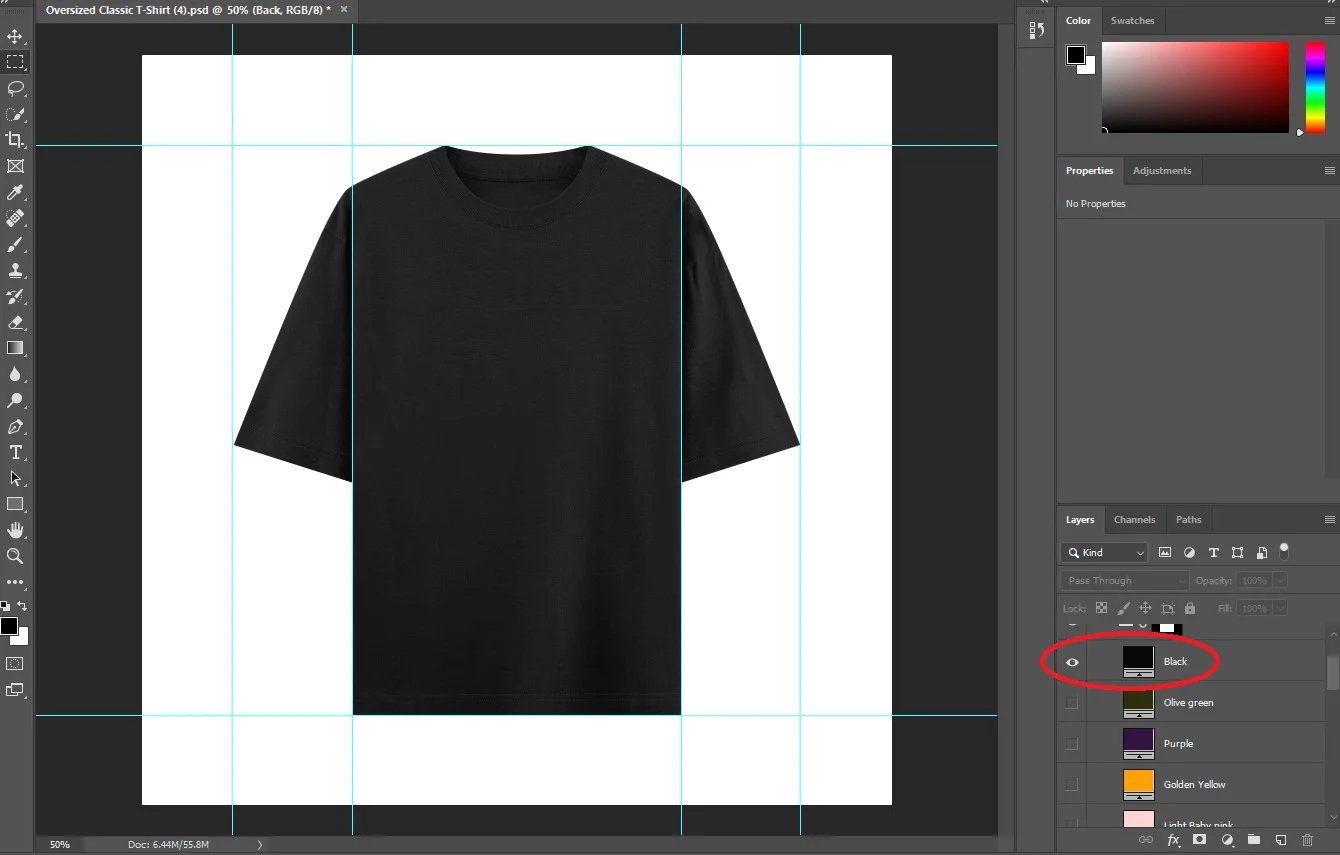
- 1Uncheck the current colors and select the desired color.
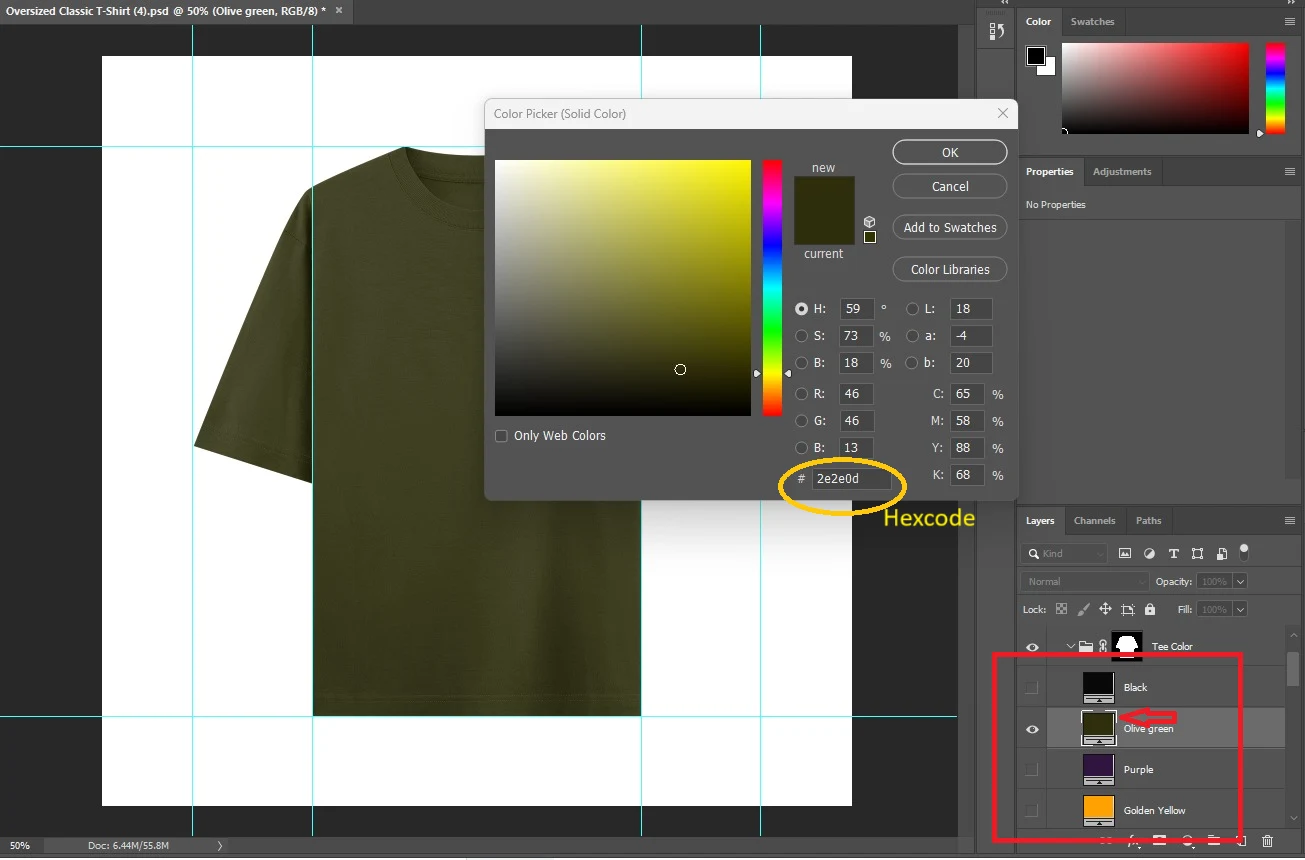
- 1To view the RGB and hex code of a specific color, simply double-click on it. A new window will open displaying all the relevant details.
Alert
Don't Edit Locked Layers
Please avoid editing the locked layers in the PSD file. Altering these layers may affect the colors and overall accuracy of the mockups.