
How reverse pickup works?
Overview
In this article, we are going to see how can we arrange a reverse pickup for order and how it will be added to the returns inventory.
- Go to All Orders > Find your order.
- Click the three dots below Action.
- Select the Create Reverse icon to book the shipment.
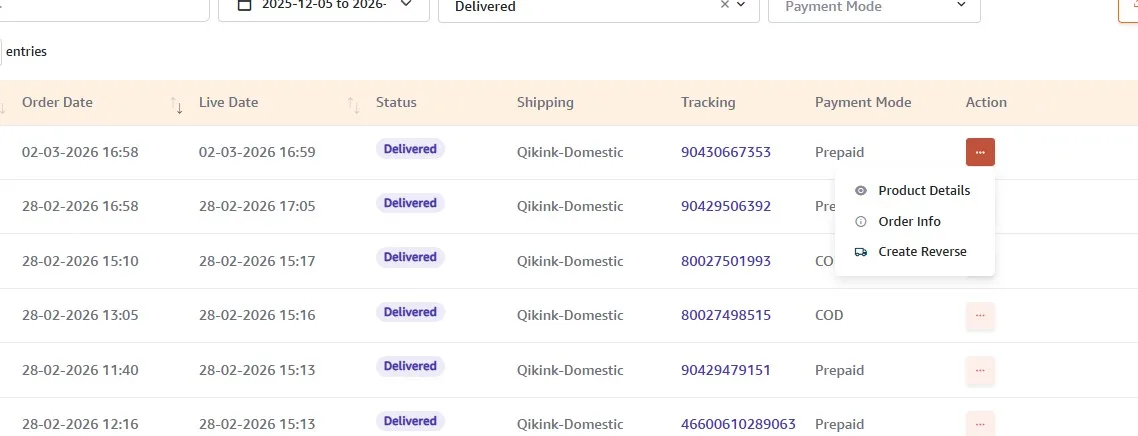
- It will be changed to "Reverse pickup initiated." after you click the create reverse button.
- Once the shipment is picked up from your customer, it will be returned to us.
- You can track your return shipment in the dashboard by clicking Track Reverse.
- When we receive the order, it will undergo a QC check.
- If it passes the QC check, we will add it to the returns. If it fails, we will not add it.
Note
The processing time for reverse shipment is 2-3 weeks. It includes the shipment picked-up time to add it to the returns. The reverse shipping amount is charged as same as the forward shipping amount for the order. You must have enough balance to initiate this process.
Note
The reverse shipping cost is the same as the forward shipping cost. For example, in an order containing 5 products, the reverse shipping charge will apply to all 5 products, but you can choose to return just 1 if you wish.
Note
You can request a return within 5 days of delivery. After that, the option will be disabled.
Frequently Asked Questions
Yes. Reverse pickup can only be initiated if you have sufficient wallet balance to cover the reverse shipping charges.
If the shipment has not yet been picked up, you may contact support to check if the request can be cancelled or modified.
Yes. If the customer receives a damaged or incorrect product, please contact our support team with an image or video of the defect, and our team will arrange a return on our end.
The customer should keep the product packed and ready for collection to avoid delays during the pickup attempt.