
How does Self-Shipping work in Qikink
Qikink allows customers to use their own courier option. To enable this feature, simply follow the steps
- 1Email care@qikink.com from your registered email address to activate the self-shipping feature.
2. Place an Order:
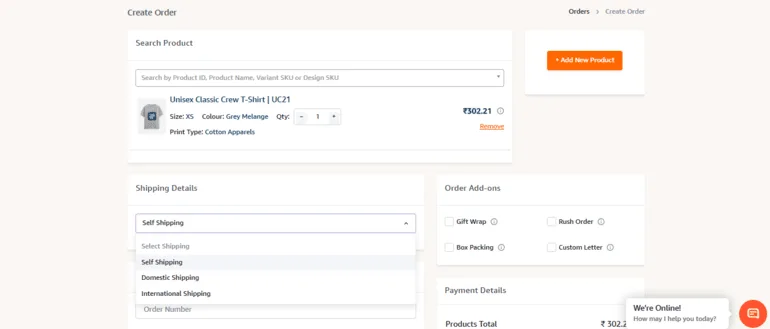
- Select "Own courier/Self" as the courier type when placing your order.
- Click "Save Order."
3. Upload Courier Slip:
- After placing your order, go to the "All Orders" section.
- Click the "+" icon next to your order.

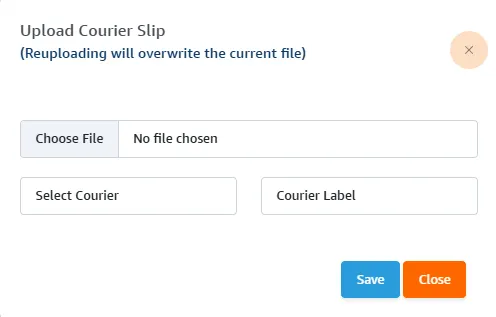
- Upload your courier slip in PDF format by clicking "Choose File."
- Select the courier type (e.g., Bluedart Express, Delhivery Air).
- Click "Save."
Manifest Your Order
Manifest Your Order: At the time of manifesting the order, Qikink will affix your courier slip to the package and dispatch it.
Important
The self-shipping option is not available for store orders. This feature is only applicable for manual orders in Qikink.
When should the courier pickup be assigned?
The courier pickup can be assigned from your end once the shipment has been manifested. The shipping label can be uploaded when the order reaches the Printed status.
For Self Shipping orders, the Ready for Pickup status will remain active for 3 days. If the courier team is unable to pick up the package on the first day, they can complete the pickup during the following 2 working days.
Courier pickup coordination and follow-up need to be handled from your end.