
Re-Shipping The Returned Orders
Note
Customer returned products can be used for your store's upcoming orders. It will ease the order processing and ship it instantly to the customer.
How does it help?
- 1Eventually, some of your orders will get returned from the customer for unavoidable reasons.
- 2If you receive the same order again, you can ship that returned order rather than process a new one.
- 3It will eliminate the time and cost incurred by producing a whole new item.
How to Re-Ship?
- 1Log in to your Qikink Dashboard. Go to the Returns Tab.
- 2There you can have a list of returned orders.
- 3Select the product you need to ship as given in the reference image.
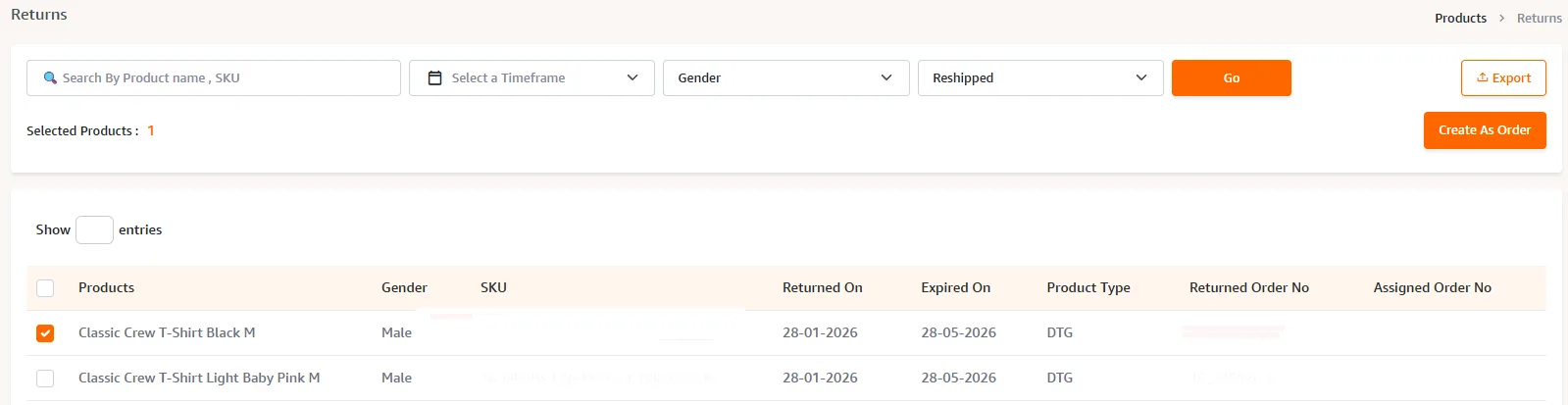
- 1Click "Create Order". A Pop-Up box will be shown as given below. Enter the order details and click "Save Order".
- 2Then your order is successfully placed from the returns.
- 3The printing type is mentioned as " Screen Print Products".
Alternative Method: Create Order
You can also place an order using the usual methods, such as Create order or Store Order.
The system will automatically fetch details from the returns and place it as a new order.
Charges for Reship
- 1Storage Cost: Rs. 20 + 18% GST per product for 100 days.
- 2Shipping cost: Applicable for the order.
Important
All returned orders will be stored in our warehouse for 100 days from the date of the order being marked as returned. You can re-ship the order to any other address or your address within 100 days after which it will be removed for re-shipping.