
Automatic NDR Flow (COD Orders)
What is Automatic NDR Flow?
The Automatic NDR (Non-Delivery Report) Flow helps merchants manage failed delivery attempts by allowing customers and merchants to take immediate action for redelivery or shipment cancellation.
Instead of contacting the Qikink Support team for every failed delivery attempt, customers can directly request a redelivery, which will be sent to the courier partner for further processing.
Note
This feature is currently available only for Cash on Delivery (COD) orders.
How the Automatic NDR Flow Works
Step 1: Out for Delivery Notification
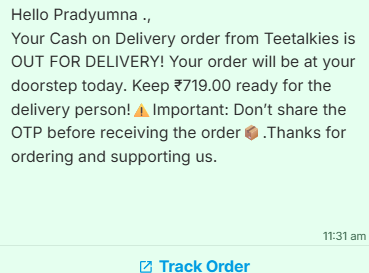
When a COD order is marked as Out for Delivery, the customer automatically receives a WhatsApp notification.
The WhatsApp message includes:
- 1
Your Brand Name
- 2
COD amount to be collected
- 3
Track Order button
Important
Qikink's name or branding will not appear anywhere in the WhatsApp message. The message will be displayed with your brand identity to provide a better customer experience.
Step 2: First Delivery Attempt Failed
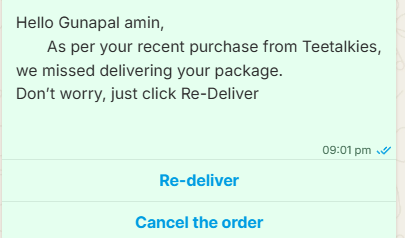
If the first delivery attempt is unsuccessful, the customer will automatically receive another WhatsApp notification.
The customer will get two options:
- 1
Redeliver
- 2
Cancel the order
Step 3: Customer Action
Redeliver
If the customer clicks Redeliver, the request will be sent directly to the courier partner.
The request will not come to Qikink Support, which helps the courier process the reattempt faster.
Cancel Order
If the customer selects Cancel Order, the shipment will proceed through the courier partner's cancellation/RTO process.
If the Customer Doesn't Respond
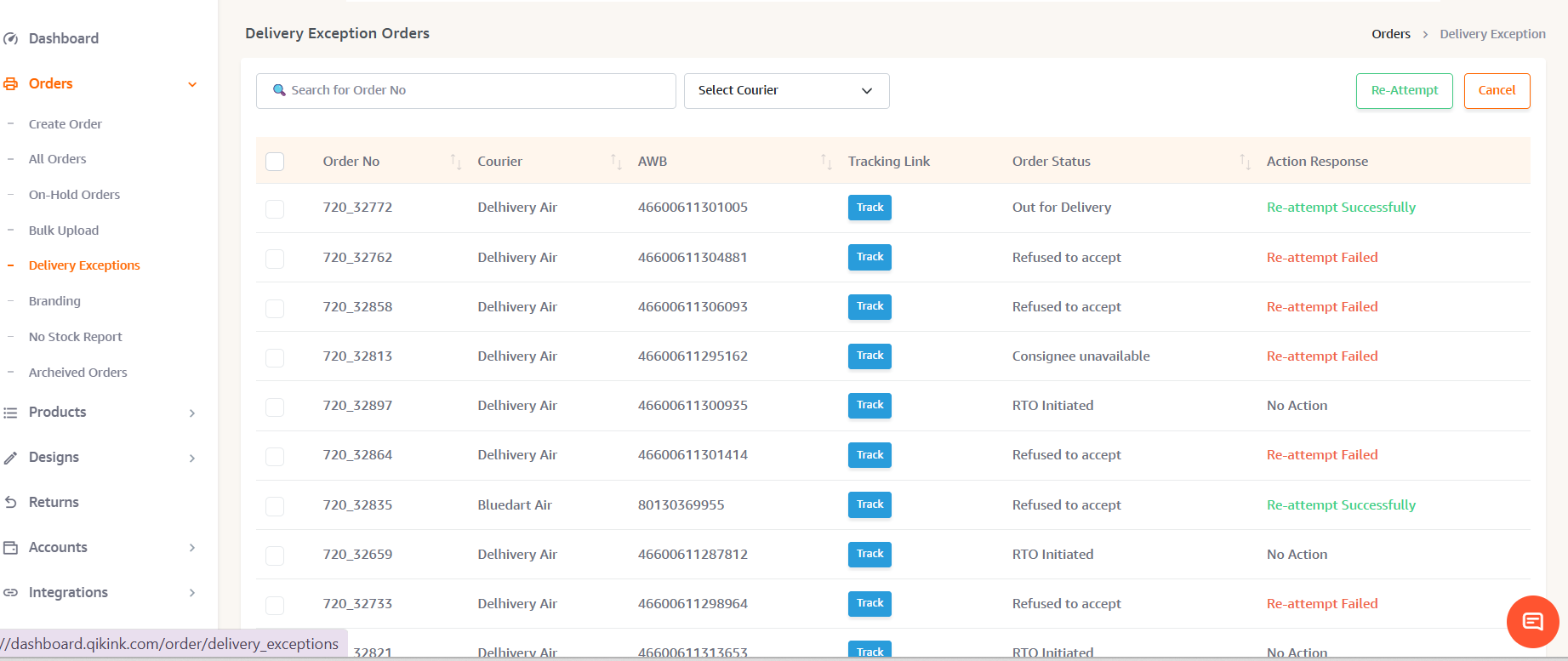
If the customer does not take any action within 24 hours, the order will be available in the Merchant Dashboard.
Navigate to:
Orders → Delivery Exception
From here, you can take action using:
- 1
Reattempt Delivery
- 2
Cancel Shipment
Important Timeline
⚠️ Please take action on pending Delivery Exception orders before 3:00 AM.
- 1
Go Out for Delivery again, or
- 2
Move towards the RTO process.
If you request a reattempt after the courier has already processed the shipment, another failed delivery notification may be generated.
Delivery Exception Dashboard
You can monitor and manage pending NDR shipments from:
Orders → Delivery Exception
From this section, you can:
- 1
View failed delivery orders
- 2
Request a reattempt
- 3
Cancel shipments
- 4
Check delivery exception status
We recommend checking this section regularly to take timely action.
The Action Response column shows the response received from the courier.
Re-attempt & Cancel Actions
Click the Re-Attempt or Cancel button in the top-right corner to perform the respective action for the selected orders. The action result will be shown as:
- 1
Re-attempt Successfully
- 2
Re-attempt Failed
- 3
Cancel Successfully
- 4
Cancel Failed
Re-attempt Action
Click Re-Attempt to retry the delivery for the selected order.
- 1
Re-attempt Successfully – The courier accepted the re-attempt request.
- 2
Re-attempt Failed – The re-attempt failed on the courier’s side. This can occur if the order has reached the maximum re-attempt limit, the OTP has already been accepted, the order has moved to RTO, or the courier has other restrictions.
Cancel Action
- 1
Cancel Successfully – The courier accepted the cancellation request.
- 2
Cancel Failed – The cancellation failed due to an issue on the courier’s side.
If No Action Is Taken
- 1
No Action – No action was performed for the order.
Automatic RTO
If no action is taken by either the customer or merchant, Qikink will wait for 72 hours.
After 72 hours, the shipment will automatically move to RTO (Return to Origin) as per the courier partner's process.
Frequently Asked Questions (FAQ)
No. Currently, this feature is available only for Cash on Delivery (COD) orders.
No. Qikink branding will not appear anywhere in the customer WhatsApp communication. The message will be sent with your brand name.
The redelivery request will be sent directly to the courier partner for processing. You do not need to contact Qikink Support for this request.
If the customer does not take any action within 24 hours, the order will move to:
Orders → Delivery Exception
You can manually take action from there.
Please take action before 3:00 AM on pending orders to avoid the shipment moving towards another delivery attempt or RTO process.
If no action is taken within 72 hours, the shipment will automatically move to RTO (Return to Origin).
"Reattempt Failed" means the reattempt request could not be sent to the courier partner.
This may happen because:
The shipment is already Out for Delivery, or
The shipment has already moved towards RTO (Return to Origin) or Refused to Accept or Maximum attempt reached
In these cases, the courier partner will not accept a new reattempt request.
Need Help?
For any queries or assistance regarding the Automatic NDR Flow, please contact our support team at care@qikink.com