
How to edit or cancel an order?
Pro Tip
You can cancel an order until it is in "Live" status.
How to cancel an order?
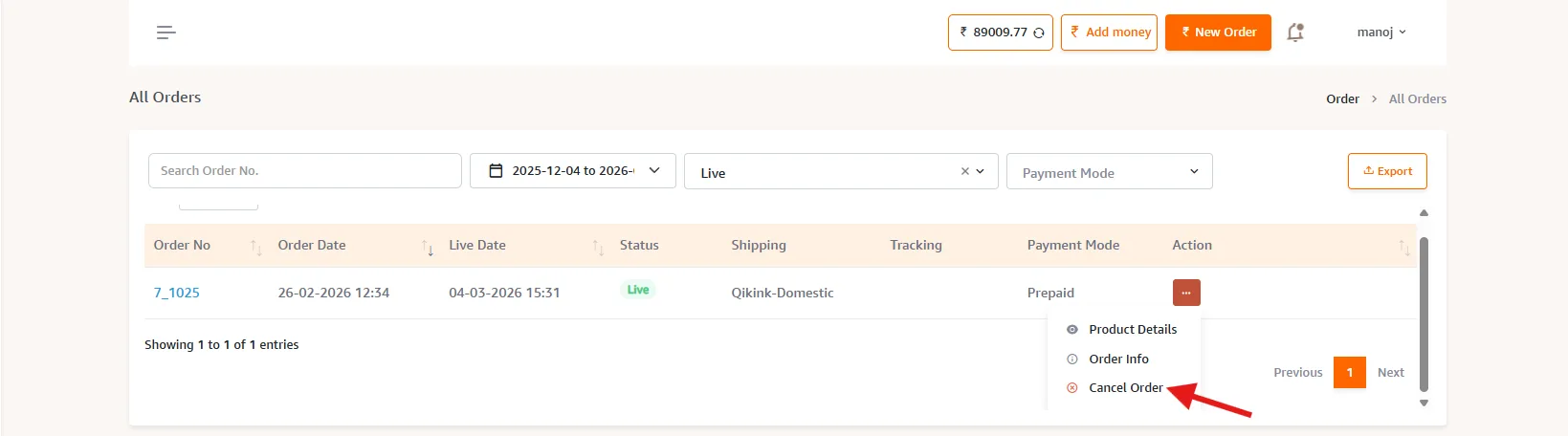
- 1If you wish to cancel an order after you have placed it, go to Orders > All orders.
- 2Select the order that you wish to cancel.
- 3Click on the three dots icon under Actions and select cancel order.
- 4Click Confirm to cancel the order.
Pro Tip
The total order value will be transferred to your wallet credits after you cancel the order.
Edit an order after placing it
Alert
You can edit the shipping details only until the order is Printed.
- 1To edit existing order details, go to Orders > All orders.
- 2Select the order in which the details need to be updated.
- 3Click on the three dots under Actions and select order info.
- 4Make the changes you wish to make.
- 5Click Submit to confirm the changes.
Alert
You can only change the customer information and shipping details. You will have to cancel and place the order again in case you wish to change the ordered products.