

Selling products online through Amazon India involves registering as a seller, listing products, choosing a fulfilment method, and managing orders, returns, and payments. For most taxable products, sellers need a GSTIN to register and sell on Amazon India. Sellers dealing only in eligible GST-exempt products may have different registration requirements.
To start selling, a seller creates an account on Amazon Seller Central and provides business, tax, pickup address, and bank account details. Products can then be added to the Amazon catalogue with details such as price, images, description, and available quantity. Amazon India offers FBA (Fulfilment by Amazon), Easy Ship, and Self Ship or FBM (Fulfilled by Merchant) for order fulfilment.
The total cost of selling depends on the product category, selling price, fulfilment method, shipping, returns, advertising, and other applicable charges. Understanding these costs before listing a product helps set a price that covers expenses and leaves room for profit.
Key Takeaways:
- Amazon seller registration includes choosing the appropriate selling plan, such as Individual or Professional, along with submitting the required business, tax, address, and bank details.
- Amazon allows products to be added by matching an existing ASIN (Amazon Standard Identification Number), creating a new product listing, or using bulk listing options where applicable.
- A narrow GST registration exception can apply to eligible sellers operating only within one state or Union Territory, subject to specific conditions. It does not provide a general exemption for sellers shipping products across India.
- Amazon India changed parts of its seller fee structure in 2026, including referral fees, cancellation fees, and closing fees, so older fee examples may no longer reflect the current charges.
How Does Selling on Amazon India Work?
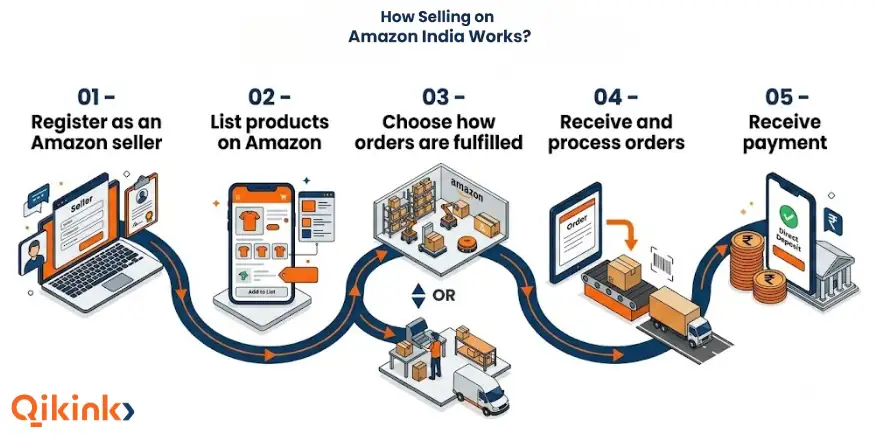
Selling on Amazon India follows a five-stage process. The seller first creates the account and adds products to Amazon’s catalogue, then chooses how orders will be delivered and receives the sale proceeds after Amazon’s applicable fees and adjustments.
- Register as an Amazon seller: The seller creates an account through Amazon Seller Central, completes GST or PAN verification, and sets up the store, pickup address, and shipping details. The selling plan affects how Amazon charges the seller and which selling tools are available.
- List products on Amazon: Products are added by matching an existing listing, creating a new one, or using bulk upload, along with the product information required for the listing.
- Choose how orders will be fulfilled: FBA, Easy Ship, and Self-Ship differ in who stores, packs, and delivers each order.
- Receive and process orders: Orders are fulfilled through the selected method, with inventory and order status kept current in Seller Central.
- Receive payment: Amazon settles eligible proceeds to the seller’s bank account after fees and adjustments, on a recurring cycle confirmed in Seller Central.
The practical flow is
“Register → List → Fulfil → Deliver → Receive Payment”
The seller remains responsible for choosing products, setting prices, maintaining accurate listings and stock, and meeting Amazon’s selling requirements, while the fulfilment responsibilities depend on the method selected.
Free Amazon Seller Launch Checklist
Get the practical checklist and AI prompts you need to turn a product idea into a live dropshipping store in India.
Amazon Seller Launch Checklist
Interactive checklist for product research, store setup, marketing and operations with AI prompts.
Start With Qikink
Create products and let Qikink handle printing, packing and shipping.
What to Sell on Amazon India?
The right product to sell on Amazon India should have clear customer demand, manageable competition, suitable costs, reliable fulfilment, and enough margin after selling expenses.
| Selection factor | What to check |
|---|---|
| Demand | Customer interest and search activity for the product |
| Competition | Number of similar listings, prices, reviews, and brands |
| Costs | Product cost, Amazon fees, shipping, packaging, and taxes |
| Fulfilment | Product size, weight, storage, packing, and delivery requirements |
| Returns | Replacement, sizing, or quality issues |
| Restrictions | Category approval, documents, or product-specific requirements |
| Margin | Amount left after all selling and operating costs |
Product Categories Commonly Sold on Amazon India
Amazon India has common product categories to sell online such as:
- Apparel and clothing
- Beauty and personal care
- Home and kitchen
- Electronics and mobile accessories
- Books and stationery
- Shoes, bags and luggage
- Toys and games
- Pet supplies
- Jewellery and watches
Category and product-level requirements can vary, so the current applicable Amazon selling requirements should be checked before listing or sourcing a product.
Find Profitable Niches!
Explore trending niches, complete with insights, examples, and tips to choose
Dropshipping Niches →
Business Models for Selling on Amazon India
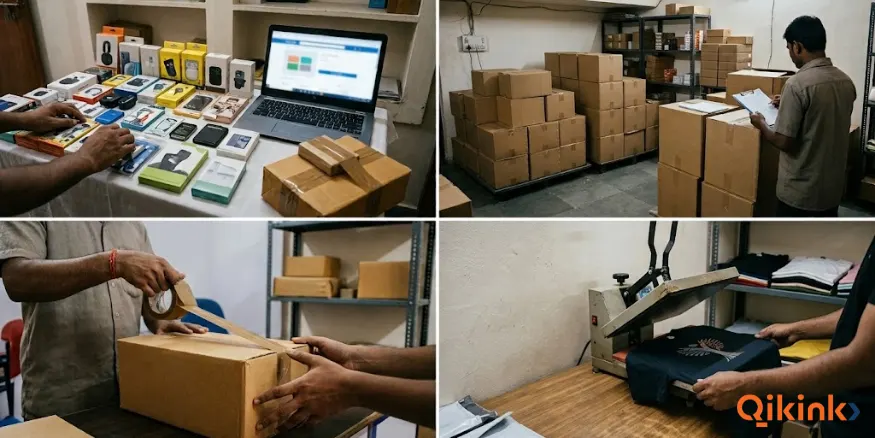
Four common business models for selling on Amazon India are retail, wholesale, dropshipping, and print on demand.
1. Retail
Retail selling involves buying products from manufacturers, distributors, or other suppliers and selling them individually to Amazon customers. The seller usually purchases and holds the inventory before receiving customer orders.
2. Wholesale
Wholesale selling involves purchasing products in larger quantities from manufacturers or authorised distributors and listing them on Amazon for individual sale. The higher purchase volume can affect the product’s unit cost, but it also requires more inventory and working capital.
3. Dropshipping
Dropshipping in India allows a seller to list products without keeping the inventory personally. After an order is received, a supplier fulfils and ships the product to the customer, while the Amazon seller remains responsible for the listing, pricing, order management, and customer service.
Amazon’s dropshipping requirements still apply, including the seller being identified as the seller of record and removing any third-party supplier information from packing slips and packaging before the order ships.
4. Print on Demand
Print on demand (POD) is a model where products are produced only after an order is received. A print on demand provider can handle production, packing, and shipping, while the Amazon seller manages the product designs, listing, pricing, and customer-facing store.
POD is suited to products such as custom-printed apparel and merchandise because the seller does not need to purchase finished inventory in advance.
How to Register as an Amazon Seller in India?
To register as an Amazon seller in India, create a seller account through Amazon Seller Central and complete the required GST, store, pickup, shipping, bank, tax, and product-listing details.
Step 1: Start Registration on Amazon Seller Central
Source: Amazon
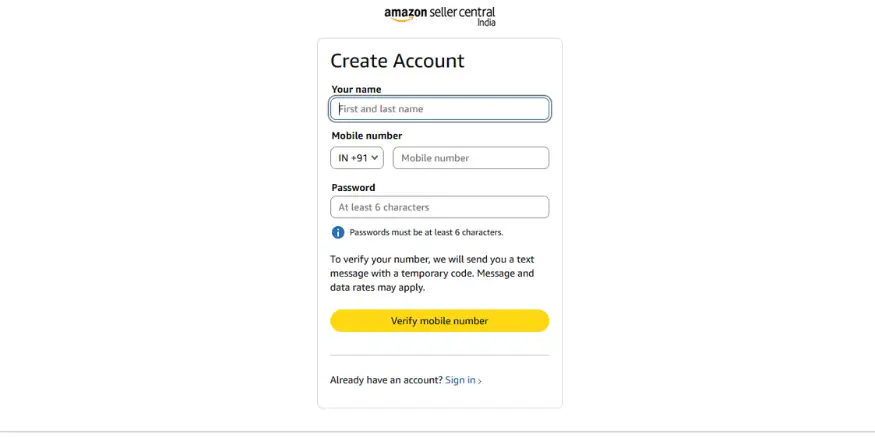
Start Amazon seller registration by going to Amazon Seller Central or the Amazon India selling page and selecting Start Selling. An existing Amazon customer account can be used to begin the process, or a new Amazon account can be created using:
- Name
- Mobile number
- Email address
- Password
Amazon asks users signing in with an existing account to verify the phone number through an OTP. The email address and mobile number used for registration should remain accessible because Amazon uses the account for seller communications and verification.
Individual vs Professional Amazon Seller Account
Amazon offers Individual and Professional selling plans. The Individual plan uses a per-item selling-plan fee rather than a monthly subscription, while the Professional plan uses a monthly subscription and provides additional selling tools, including features for bulk listing and inventory management.
The selling plan should not be confused with the seller’s legal business type. An Individual selling plan does not mean the seller is operating as an individual business, and a Professional selling plan does not require the seller to be a company.
Note:
Amazon can change plan pricing, features, and terms, so the current selling-plan charges should be checked in Seller Central before choosing an account plan.
Step 2: Enter and Verify GST Details
Source: Amazon
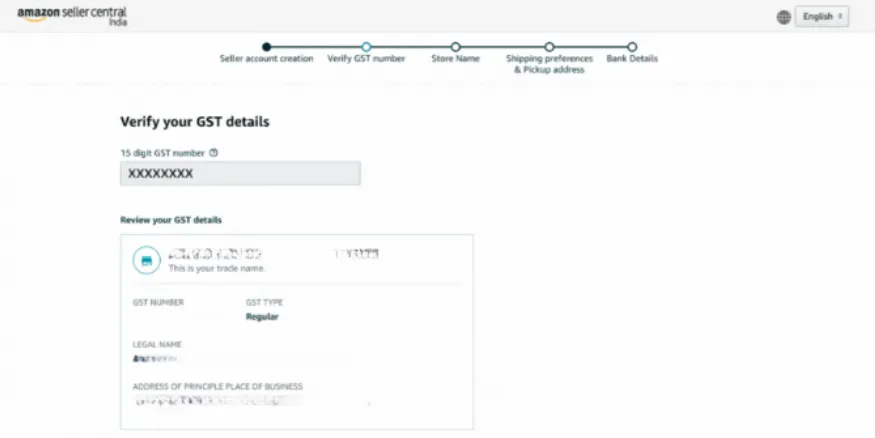
For sellers who need GST registration, the GSTIN is entered after signing in to the seller account. Amazon verifies the GST number as part of the registration process. Sellers who exclusively sell GST-exempt products can select the option indicating that they only sell tax-exempt products, such as books, instead of entering a GSTIN.
After entering a GSTIN, select Continue to Verify. GST verification can take up to 72 hours, and the remaining registration steps can be completed while it is under review.
Step 3: Choose an Amazon Store Name
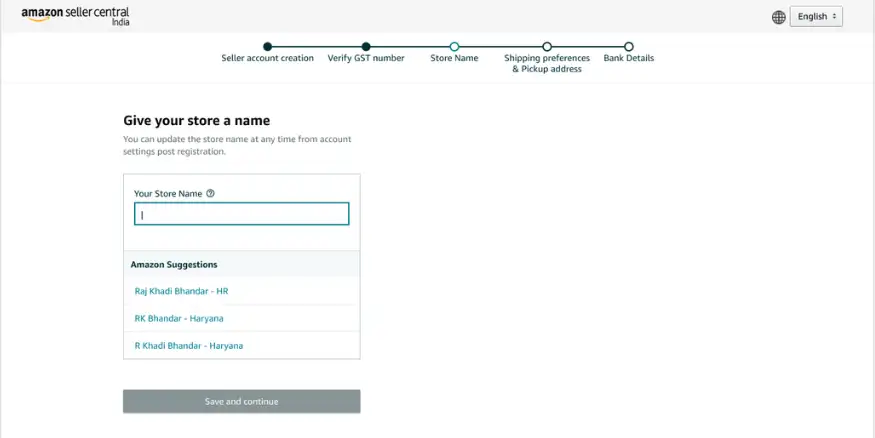
Source: Amazon
The Amazon store name is the customer-facing name that represents the seller’s store on Amazon. It can be different from the legal or registered business name used for tax and account purposes.
Amazon may show suggested store names during registration, or the seller can enter a preferred name manually. The name must be available for use on Amazon and should clearly distinguish the store from other sellers.
The store name can be changed later through Seller Central account settings. Since the same store can contain products from different categories, a name that can represent the wider product catalogue is generally more practical than one tied too closely to a single product.
Step 4: Add the Pickup Address
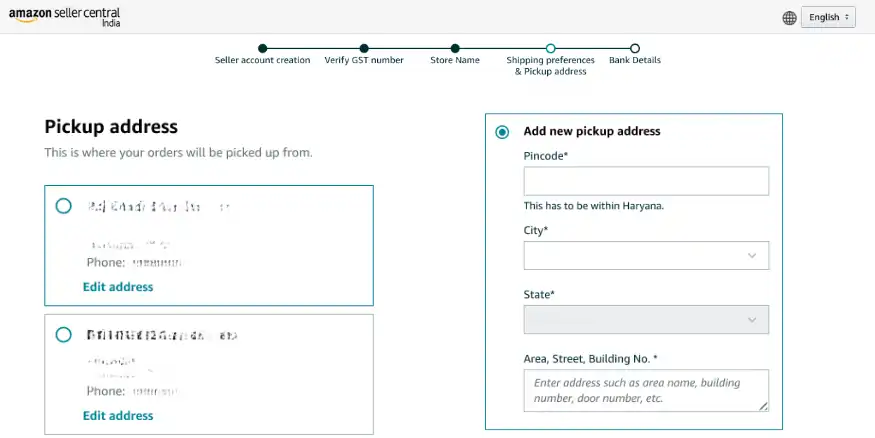
Source: Amazon
The pickup address is the location from which product shipments are collected for customer orders when the selected shipping arrangement requires pickup. The pickup address must be in the same state in which the GST is registered.
The GST-registered address is available as an option during registration. If the seller needs to use another eligible pickup location, the address can be added through Seller Central account settings.
Step 5: Choose a Shipping Method
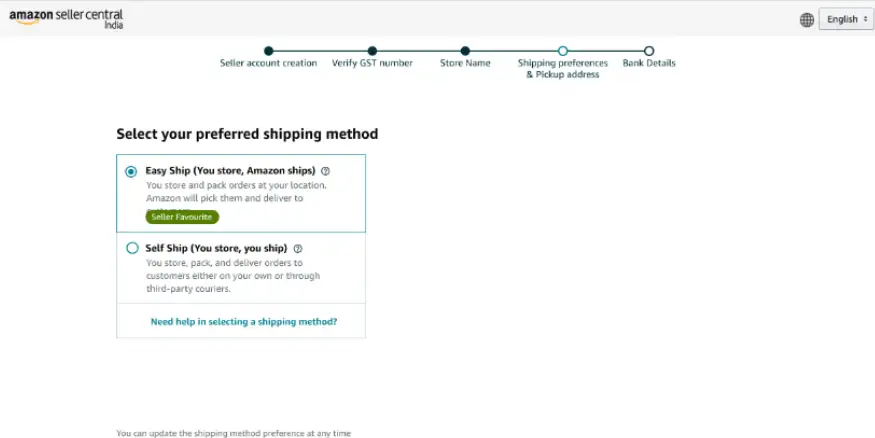
Source: Amazon
During registration, Amazon currently presents Easy Ship and Self Ship as the shipping-method choices. The choice determines who handles the delivery after the seller has prepared an order.
- With Easy Ship, the seller stores and packs the order at the pickup location, and Amazon collects and delivers the shipment to the customer. Applicable Amazon charges are added for the service.
- With Self Ship, the seller stores, packs, and ships the order using their own delivery arrangement or a third-party courier. The seller is responsible for the shipping cost and delivery arrangement under this method.
Amazon also offers Fulfilment by Amazon (FBA), where Amazon stores and fulfils eligible inventory.
Step 6: Add the Bank Account
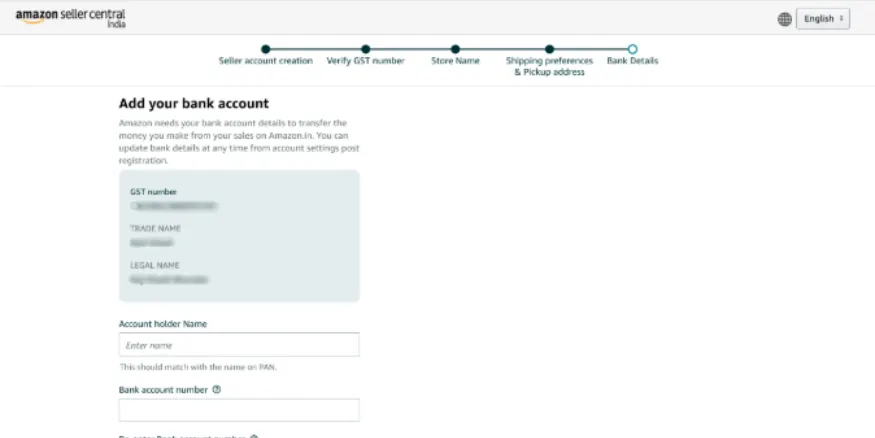
Source: Amazon
Amazon requires an active bank account to receive payments from Amazon India sales. The account details entered during registration should belong to the business entity being registered on Amazon.
Enter the bank account information carefully because Amazon transfers the payments due to the seller to this account. Amazon also allows bank details to be updated later through Seller Central account settings.
Step 7: Select the Default Product Tax Code
Source: Amazon
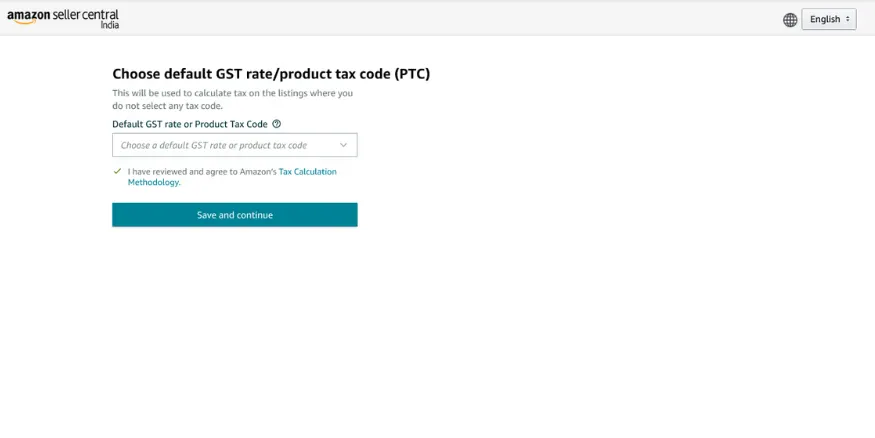
Amazon asks sellers to select a Default GST Rate or Product Tax Code (PTC) during registration. This represents the tax rate applicable to the product category and is used by Amazon’s tax calculation system for listings where a different tax code has not been selected.
If a seller plans to sell products across categories with different GST rates, the default PTC should represent the rate applicable to the largest number of categories being sold. A different applicable GST rate can be selected while creating individual product listings for categories that use another rate.
The PTC should be selected based on the actual GST treatment of the products rather than simply choosing a rate to reduce the tax amount. Product-level GST classification remains the seller’s responsibility.
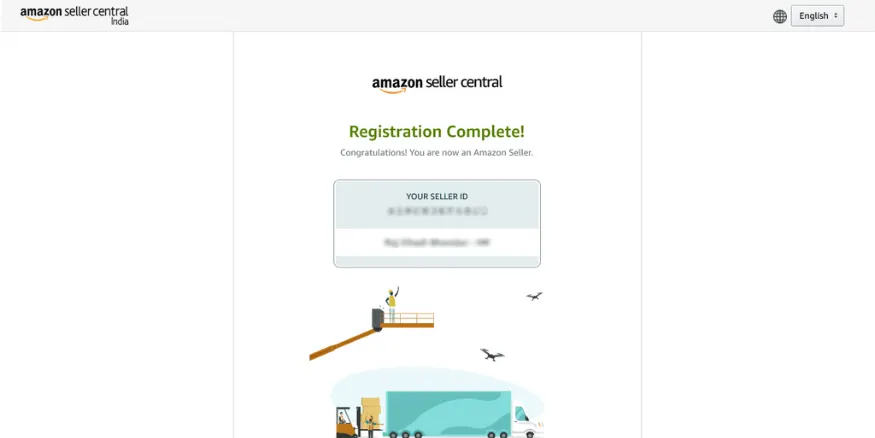
Step 8: List the First Product
Source: Amazon
Amazon requires the seller to add at least one product listing before the store can be launched. Select Add products and start selling, then enter the product information requested by Amazon, including:
- Product images
- Product title and description
- Product price
- Available quantity
- Other required listing details
A seller can add an offer to an existing product in Amazon’s catalogue or create a new product listing when the product is not already available in the catalogue. The correct route depends on whether the exact product already exists on Amazon.
Step 9: Launch the Amazon Store
Source: Amazon
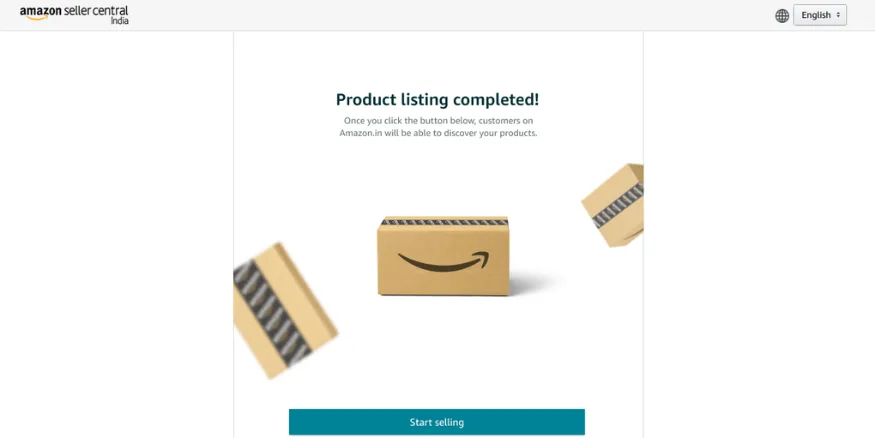
After completing the required registration steps and adding at least one product listing, the seller can launch the Amazon store. Select Start selling to complete the launch process. Once the account is active, Seller Central becomes the main place to manage product listings, inventory, orders, shipping settings, payments, tax information, and other seller-account requirements.
Launch Your Dropshipping Store Online!
Explore practical dropshipping tips you need to build and run an online store
Start a Dropshipping Business in India →
Can You Sell on Amazon India Without GST?
You can sell on Amazon India without a GSTIN only in limited cases. For most taxable products sold through Amazon, GST registration is required from the first applicable marketplace sale unless the seller qualifies for a specific exemption. The two relevant routes are selling only GST-exempt products or qualifying for the specific exemption under Notification 34/2023-Central Tax.
Selling Only GST-Exempt Products
Sellers who exclusively sell GST-exempt products may be able to sell on Amazon without a GSTIN by providing PAN details instead. This route applies only when the products being sold qualify for a GST exemption. If a seller starts selling taxable products, the GST registration requirement can apply, and the seller must follow the applicable GST rules.
Selling Taxable Products Under Notification 34/2023
Notification 34/2023-Central Tax, effective from October 1, 2023, provides a limited exemption from mandatory GST registration for certain small suppliers of goods selling through an e-commerce operator.
The seller’s aggregate turnover in the preceding and current financial year must not exceed the applicable registration threshold under the relevant GST rules, and all conditions of the notification must be satisfied.
The seller must:
- Not make inter-State supplies of goods.
- Not supply goods through an e-commerce operator in more than one State or Union Territory.
- Have a valid PAN.
- Declare the PAN, business address, and State or Union Territory of supply on the GST common portal for validation.
- Obtain an enrolment number after successful validation.
- Not make supplies through the e-commerce operator before receiving the enrolment number.
The enrolment number is different from a GSTIN. If the seller later obtains GST registration, the enrolment number becomes invalid from the effective date of that registration.
Why Notification 34/2023 Does Not Cover Nationwide Amazon Selling?
Notification 34/2023 is not a general exemption from GST for selling taxable products across India. Its conditions do not permit inter-State supplies and restrict the seller to supplying goods through an e-commerce operator in only one State or Union Territory.
For example, an eligible small seller supplying taxable goods only within one State may fall within the notification’s conditions. A seller intending to make taxable-goods supplies across multiple states through Amazon cannot use this exemption as a substitute for GST registration.
GST Requirement at a Glance:
| Seller situation | GSTIN requirement |
|---|---|
| Selling taxable products on Amazon under the normal marketplace rules | Generally required |
| Selling only products that are exempt from GST | GSTIN may not be required |
| Eligible small seller covered by Notification 34/2023 | GSTIN may not be required, subject to all conditions |
| Selling taxable goods across multiple states through Amazon | Notification 34/2023 does not provide an exemption |
For most Amazon sellers dealing in taxable products and serving customers across India, GST registration remains the applicable route. The GST requirement depends on the products being sold and how the seller makes supplies, so the current GST rules should be checked before selling without a GSTIN.
How to List Your Products on Amazon India?
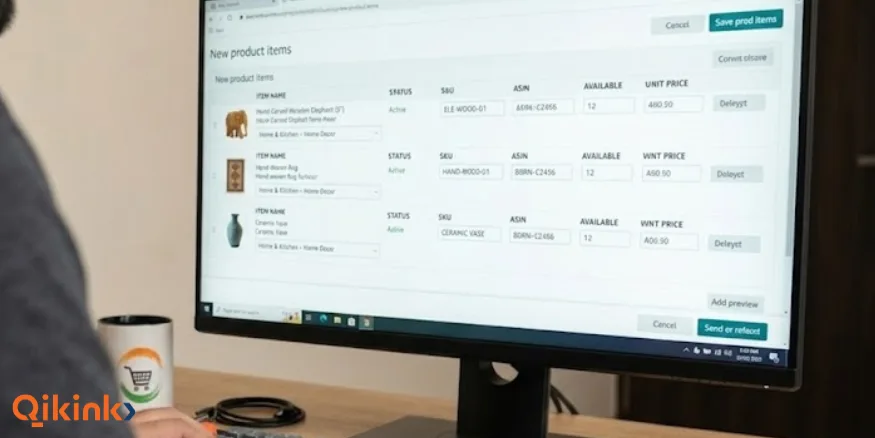
To list a product on Amazon India, use one of three methods: match an existing ASIN, create a new listing, or upload products in bulk. The right method depends on whether the product is already in Amazon’s catalogue and how many products need to be added.
1. Match an Existing ASIN
If the exact product is already listed on Amazon, search for it and add an offer to that ASIN. Only match an existing listing when the product is an exact match.
2. Create a New Product Listing
If the product is not already in Amazon’s catalogue, create a new listing and enter the required product information. Amazon generates an ASIN for the new product.
The main information required includes:
- Title: Clearly identify the product and its important attributes. Product titles can be up to 200 characters.
- Images: Use clear product images that meet Amazon’s requirements. Amazon requires product images to be at least 500 pixels on the longest side, and recommends at least 1,000 pixels to enable the zoom feature on the product page.
- Bullet points: Highlight the product’s important features and specifications clearly.
- Description: Provide accurate product details, specifications, and relevant usage information.
- Variations: Add options such as size or colour when the category supports them.
- Price and quantity: Enter the selling price and available stock.
- Category-specific details: Complete any additional attributes, approvals, or compliance information required for the product category.
The information should match the actual product being sold. Images, variations, attributes, and product specifications should not describe something different from what the customer will receive.
3. Upload Products in Bulk
Sellers with multiple products can use Amazon’s bulk listing option through inventory file templates. This allows product information to be uploaded in batches instead of creating each listing individually.
Bulk upload is more useful for larger catalogues with structured product information. For a small number of products, individual listings can make it easier to check each product before submission.
Tip
Before publishing, verify the product information, images, variations, price, quantity, and category-specific requirements. Amazon can require additional information or approval for certain products and categories, so the requirements shown in Seller Central should be checked for the specific product.
How to Choose a Fulfilment Method?
The right Amazon fulfilment method depends on who manages storage, packing, delivery, and the costs associated with each stage. Amazon India offers three general options: Fulfilment by Amazon (FBA), Easy Ship, and Self-Ship.
| Fulfilment method | Storage and packing | Delivery | Main consideration |
|---|---|---|---|
| FBA | Amazon | Amazon | Inventory is sent to Amazon before customer orders are received. |
| Easy Ship | Seller | Amazon | Seller manages inventory and packing, while Amazon handles eligible deliveries. |
| Self-Ship | Seller | Seller or third-party courier | Seller controls the delivery arrangement and pays the delivery cost. |
Fulfilment by Amazon (FBA)
With FBA, the seller sends eligible inventory to an Amazon fulfilment centre. Amazon stores, packs, and delivers the products when orders are received, and also handles applicable customer queries and returns.
FBA requires inventory to be sent to Amazon in advance, so stock planning becomes important. Sellers with several sizes, colours, or other variations need to plan how much inventory to send and when to replenish it. FBA also involves fulfilment and storage-related charges in addition to other applicable Amazon selling fees.
Easy Ship
Easy Ship has specific eligibility limits that sellers should check before choosing it. Amazon does not support oversized or bulky products weighing over 18 kg or measuring 70 × 70 × 45 cm or more through Easy Ship. Delivery is also unavailable for buyer addresses outside the Easy Ship coverage area, and certain restricted products are excluded.
This means product size, weight, destination coverage, and category restrictions should be checked before relying on Easy Ship for a particular catalogue.
Self-Ship
Self-Ship or FBM gives the seller responsibility for arranging delivery through a third-party courier or their own delivery network. The seller also bears the shipping cost and needs to manage shipment tracking and delivery performance.
Delivery performance matters because Amazon tracks seller-controlled metrics such as late dispatch and cancellation rates. Sellers using Self-Ship therefore need a reliable dispatch process and should ensure orders are shipped within the required timelines.
What to Consider Before Choosing?
The fulfilment method should be evaluated against:
- Inventory: Where products will be stored, how much stock needs to be maintained, and whether the method requires sending stock in advance.
- Product size and weight: These can affect fulfilment eligibility and shipping costs.
- Delivery coverage: Particularly important for Easy Ship and third-party courier arrangements.
- Shipping cost: Compare Amazon’s applicable charges with the actual cost of external fulfilment.
- Returns: Check who will handle returned products and the related processing.
The expected fulfilment cost should be included when calculating the selling price and margin.
Note:
Qikink has discontinued its support for Amazon Easy Ship orders and now only supports Self-Ship for Amazon orders. Amazon orders must be placed manually in the Qikink Dashboard. Qikink processes and dispatches the order through its courier partners, after which the seller adds the tracking details to Amazon Seller Central.
Cost of Selling on Amazon India
The cost of selling on Amazon India depends on the product category, selling price, fulfilment method, product size and weight, and other applicable charges.
Main Amazon Seller Fees
| Fee | What it covers |
|---|---|
| Referral fee | A percentage of the selling price that varies by category and price range |
| Closing fee | A per-sale fee that varies by product price, category, and fulfilment channel |
| Shipping or weight-handling fee | Applicable delivery-related charges based on factors such as fulfilment method, weight, size, and distance |
| Other fees | Charges that may apply to specific services, fulfilment arrangements, or programmes |
Amazon’s 2026 fee changes include 0% referral fees for eligible products priced up to ₹1,000 across 1,800+ categories. The applicable referral fee still depends on the product category and other conditions.
Closing fees increased on September 7, 2026, by ₹1 for items priced up to ₹500 and by ₹3 for items priced above ₹500 across Fulfilment Centre, Easy Ship, and Seller Flex.
From August 17, 2026, the cancellation fee for eligible Easy Ship and Self-Ship orders was restructured based on order value:
- Below ₹10,000: 10%
- ₹10,001 to ₹50,000: 8%
- ₹50,001 to ₹1 lakh: 5%
- Above ₹1 lakh: 2%
Amazon’s seller fees, including the cancellation fee, are displayed before GST, and an additional 18% GST applies to each.
How to Calculate Your Selling Cost?
A simple revenue calculation is:
“Selling price − Amazon fees − product cost − fulfilment or shipping cost = amount remaining before other business expenses”
For example, if a product sells for ₹1,000 and the product costs ₹350, the remaining ₹650 is not the seller’s profit. Amazon fees, fulfilment or shipping, packaging, returns, advertising, and applicable taxes still need to be accounted for.
The actual fee for a product should be checked in Seller Central before fixing its selling price because Amazon charges vary by category, price, fulfilment method, and product characteristics.
Amazon Payment Settlement
Eligible sellers receive payment 7 days after delivery, with sales proceeds deposited into the registered bank account on a recurring 7-day cycle after applicable fees and adjustments.
This 7-day cycle applies to sellers at the Standard tier of Amazon’s STEP programme. Sellers who move up STEP levels can get faster disbursement cycles and other benefits.
The payment cycle is important when planning inventory purchases and other business expenses, particularly when the seller pays for products before receiving the Amazon settlement.
Scaling Your Amazon Business
Scaling an Amazon business involves improving the products and listings that are already selling, controlling costs, maintaining reliable fulfilment, and increasing sales through suitable advertising.
- Review listing performance: Check which products receive orders and which listings need better images, titles, descriptions, or product information.
- Monitor pricing and margins: Review competitor prices and your actual Amazon fees regularly. Adjust prices when costs, competition, or margins change.
- Maintain reliable stock and fulfilment: Keep inventory information accurate and avoid stockouts or dispatch problems that can affect order performance.
- Use Amazon advertising selectively: Sponsored ads can be used to promote eligible products and bring additional traffic to listings. Set a budget and compare advertising costs with the sales generated.
- Expand based on existing data: Add related products or variations when order data shows consistent customer interest, rather than expanding the catalogue without evidence.
Regularly reviewing sales, costs, inventory, and advertising performance gives a clearer basis for deciding which products to continue, improve, or expand.
Managing Orders, Returns and Customer Service
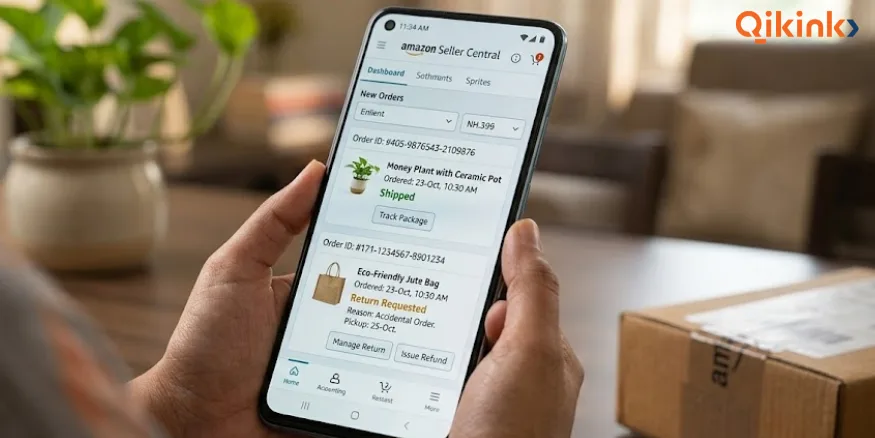
Managing Amazon orders requires accurate order processing, proper handling of returns and refunds, timely customer communication, and regular monitoring of seller performance.
1. Orders and Dispatch
For seller-fulfilled orders, the seller needs to confirm shipment, provide the required tracking information, and keep the order status updated in Seller Central. Order cancellations should also be monitored because seller-initiated cancellations and customer cancellations can have different effects on the seller’s order performance.
2. Returns and Refunds
Returns and refunds should be handled according to Amazon’s applicable policies and the product category’s return conditions. For seller-fulfilled orders, the seller needs to manage the return process and inspect returned products where applicable.
3. Customer Communication
Customer messages should be answered through Amazon’s approved communication channels and within the required response time. Responses should address the order or product issue clearly without making claims or offering arrangements that conflict with Amazon’s policies.
4. Account Health
Seller performance should be monitored regularly because issues such as late dispatches, cancellations, order defects, and policy violations can affect the seller account. Seller Central provides the relevant performance information so problems can be identified and addressed before they become recurring issues.
How to Start Dropshipping with Amazon?
Learn how to set up your seller account, find suppliers, manage orders, & scale
Amazon Dropshipping in India →
Frequently Asked Questions
1. How Do I Start Selling on Amazon India?
2. How to Sell Products on Amazon?
3. Can I Sell My Own Products on Amazon?
4. Can You Sell on Amazon Without GST?
5. What Documents Are Needed to Register as an Amazon Seller?
6. How Much Does It Cost to Sell on Amazon India?
7. How to Sell Clothes Online on Amazon India?
8. Is Selling on Amazon India Profitable?
Final Thoughts
Selling on Amazon India requires the right seller registration, product information, fulfilment setup, pricing, and ongoing order management. Before listing a product, review its category requirements, documents, fulfilment method, and expected selling costs. This gives the seller a clearer view of the actual requirements and costs before taking orders.
For sellers using Qikink for production and fulfilment, Qikink can handle the product after an Amazon order is received. The platform has been trusted by 25,000+ brands since 2016, and Qikink-fulfilled Amazon orders currently use Self-Ship.
Read More
- How to Sell Art on Amazon India: A Detailed Guide for Artists
- Dropshipping Legal Requirements in India: Complete Guide
- How to Sell T-Shirts on Amazon: Start Earning from 1st month
- How to Sell On Etsy from India: A Guide From Setup to Sales
Summarise the Article


Share the Article


