

Are you facing an issue when listing a product on Amazon with a GTIN Exemption? Most sellers are facing it, and we’ll describe what needs to be done to get a GTIN in no time.
Most products sold on Amazon require an industry-standard Product ID. These internationally recognized product IDs are called GTIN. An international organization that manages GTIN numbers is called GS1(Global Standard 1).
These GTINs help track items in transit. This GTIN ensures the product is uniquely identified when being bought and sold. In this blog guide, we share guidelines & steps to get an Amazon GTIN exemption to sell products on Amazon.
What is GTIN on Amazon?

Each GTIN has a unique barcode, which makes the product ID scannable. This Global Trade Identification Number has made the process of identifying and organizing product categories much simpler.
Because numerous products are being sold, imported, and exported across countries, these product codes ensure smooth trade.
Amazon requires its sellers to provide a valid GTIN barcode number for new and existing product listings to maintain an organized marketplace.
GTIN Amazon
If you are a seller, you need to provide a GTIN when creating new product listings on Amazon. GTIN is also sourced in a way that matches your offers to the existing products sold on Amazon.
Suppose you match a listing using other information, like a brand or product name, on Amazon. In that case, it will automatically associate your offers with the GTIN provided by the brand owner or the qualified seller who first listed the product.
You can also find a GTIN for a product above or below the barcode on its packaging or the shipping container. In general, most products sold on Amazon use one of the following GTIN types.
Types of GTIN:
- Universal Product Code (UPC): This is a standard product ID that helps you sell your products on Amazon.
- International Standard Book Number (ISBN): This is a product ID used specifically for books.
- European Article Number (EAN): It is a product code used in European marketplaces.
- Japanese Article Number (JAN): This product identity is used for products in Japanese marketplaces.
Note: Each type acts as a unique identifier, and each variation of the product will have its unique product ID. For Example, if products come in different sizes and colours, each variation has its own GTIN.
Difference between GTIN, ASIN, and SKU
It’s important to note that GTIN is different from ASIN numbers and SKUs.
- GTIN – GTIN is a universally recognized product ID used across international trade. ASIN and SKU are Amazon- and seller-specific IDs.
- ASIN – Amazon Standard Identification Number(ASIN) is used by Amazon to identify and track products in our catalogue.
- SKU – SKU is a Stock Keeping Unit. Also, this is the seller’s specified number. It can be used internally to help you identify and track inventory.
Depending on the product type you are listing, you need to locate an existing GTIN or obtain a new one. Or Apply for a GTIN Exemption.
What is Amazon GTIN Exemption?

When Dropshipping businesses in India use Print on Demand to sell on Amazon, they need this GTIN. If you don’t have any type of GTIN number on your products, then you can request Amazon to let them know that you don’t have barcodes and request brand approval. This process is called Amazon GTIN Exemption.
In most cases, a GTIN is not required to create product listings on the Amazon page. In that case, you will apply for a GTIN Exemption instead.
- Private labels or handmade products may not include product IDs. If you make products yourself or buy them from a brand manufacturer who doesn’t provide a Product ID, you can apply for a GTIN Exemption.
- Sellers might also apply for an Amazon GTIN Exemption if they are selling these product parts(like car spare parts) or bundling products in a single pack.
Sell Most Demanding Products Online
Explore product ideas, beginner tips, and smart ways to Dropship in India
Best Dropshipping Products →
How to Apply for a GTIN Exemption?
When you add a product that is not already in the Amazon store, you will be asked for the product ID. If your product doesn’t have the ID, you may be able to apply for a GTIN exemption.
Before getting started, the seller wants to have a few things ready.
- Be sure you have the brand name along with images showing all sides of the product and packaging.
- Images should show that the brand name on the product or packaging is an exact match to the name entered during the application process.
- Your images should be actual photographs of your product. Don’t use any illustrations.
- Also, show that branding is permanently affixed to the packaging, product, or both.
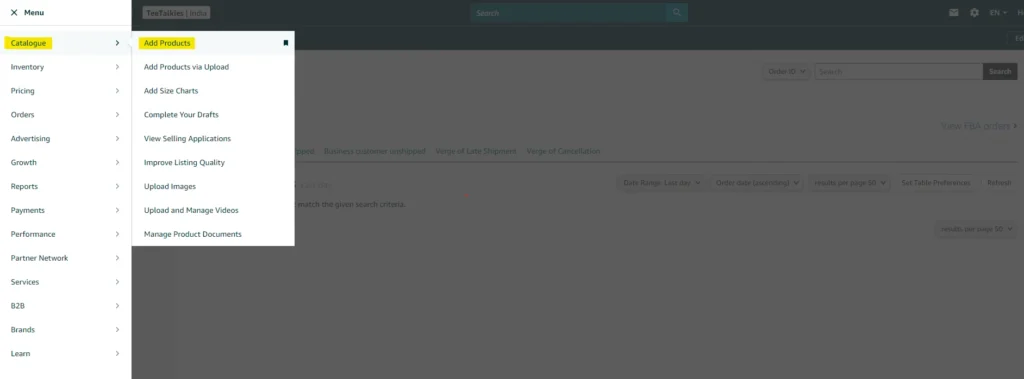
Step 1: To apply for a GTIN Exemption, open the main menu in the Seller Central account. Go to Catalogue, select Add products, and select “I am adding a product not sold on Amazon.”
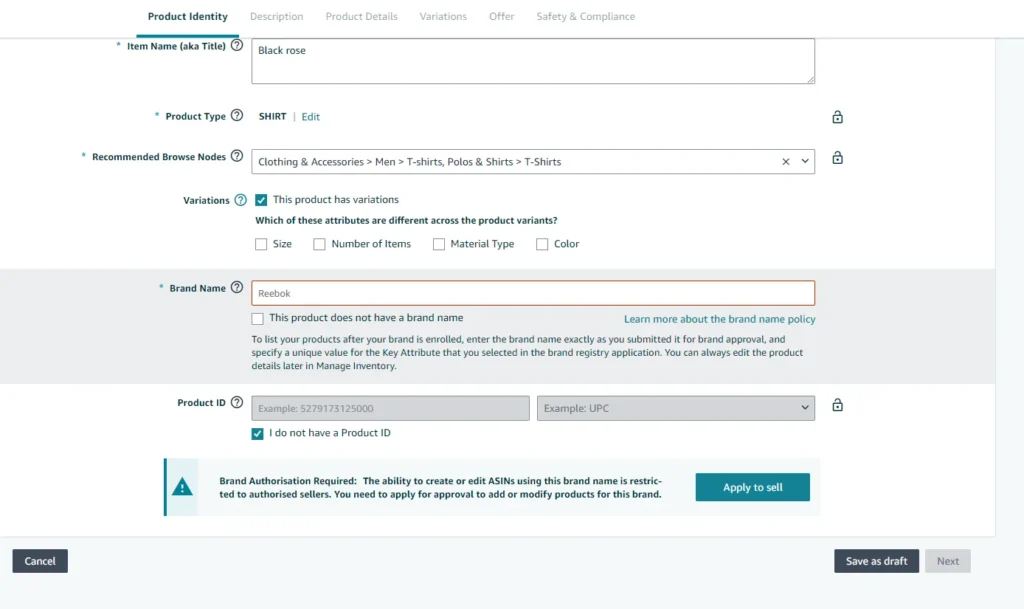
Step 2: In the Product identity section, fill in the product name and choose the category and product type, variations for which you want to request a GTIN exemption.

Step 3: In the Brand name field, enter your brand name.

Step 4: If the products you are selling are not branded or in bundle/parts, then enter “Generic” in the brand name field. Select the This product doesn’t have a brand name checkbox.
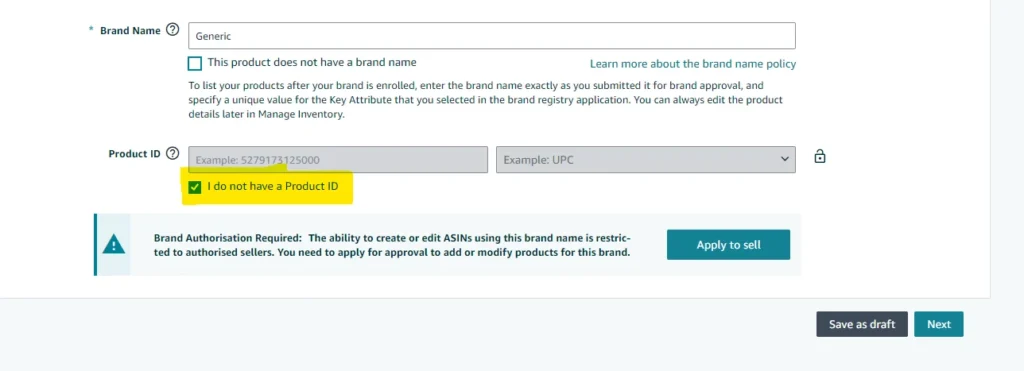
Step 5: Next, select the I do not have a product ID checkbox and click Next.
Step 6: If an exemption is required, the button Apply now will surface.
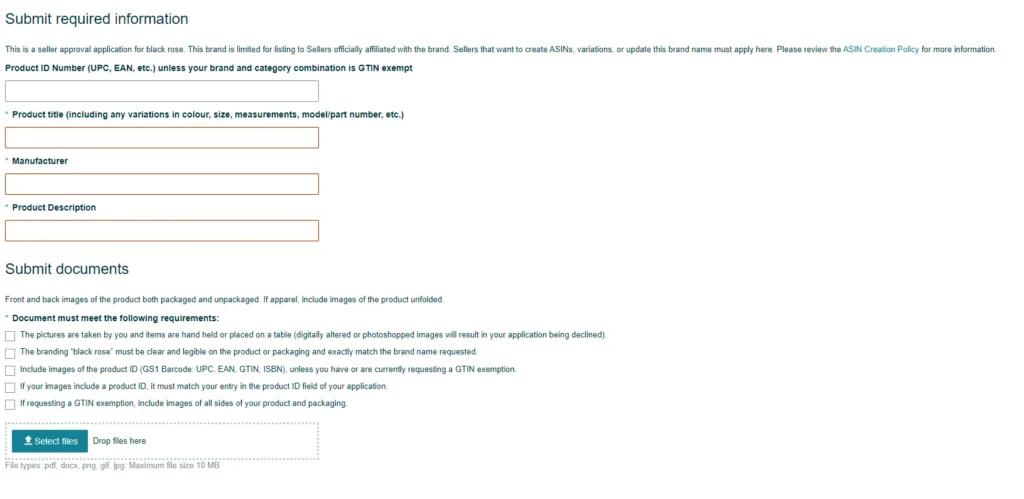
Step 7: If you have confirmation that your brand is eligible for an exemption, click Apply Now to submit documents. Documents must be submitted as a file or in PDF, GIF, and JPEG format.
The document file size should be 10 MB. If your product is not eligible for an exemption, you won’t be able to click the Continue to submit button.
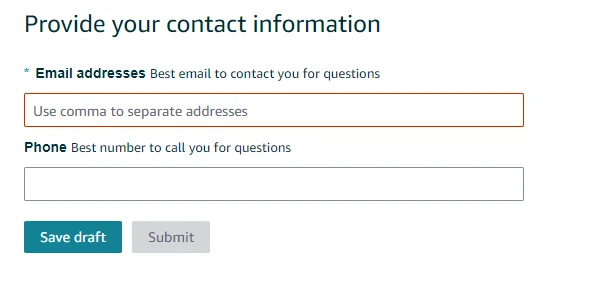
Step 8: Provide your contact information, such as a valid Mail ID and Phone Number.
Step 9: Click Submit.
You will receive an email within 48 hours regarding the approval status of your request. Also, you can check the status of your request in your case log or view the selling application page.
After you’ve been approved, you’ll be able to add the product to the Amazon catalogue by leaving the product ID box blank.
Sellers will need to obtain a new GTIN exemption for each different category. If they want to list products in various categories, they might need to apply for the GTIN exemption again for that specific category.
Read more
- Amazon Dropshipping in India: Start, Scale & Succeed
- How to Sell T-Shirts on Amazon? Start Earning from the 1st month
- How to Sell on Amazon India: Products, Profit, Requirement Guide
- Dropshipping Legal Requirements in India: Complete Guide
Frequently Asked Questions
1. How to get a GTIN for Amazon?
2. How to Sell on Amazon without GTIN?
3. Is GTIN Mandatory to Sell on Amazon?
• Private labels or handmade products may not include product IDs. If you make products yourself or buy them from a brand manufacturer who doesn’t provide a Product ID, you can apply for a GTIN Exemption.
• Sellers might also apply for an Amazon GTIN Exemption if they are selling these products’ parts(like car spare parts) or bundling products in a single pack.
4. How to Check GTIN Exemption Status?
5. What do I do if My Product doesn’t have a GTIN?
Summarise the Article


Share the Article

