
Managing Email & WhatsApp Notification Preferences
Notifications Not Controlled by Preferences
The notification preferences under Settings → Updates apply only to the notification categories listed there. Transactional and mandatory emails are not controlled by these settings.
- 1
Payment-related emails
- 2
Action-required emails
- 3
Branding order-related emails
- 4
OTP-related emails
These emails are sent automatically to the registered email address and cannot be disabled through the notification preferences.
How to Manage Notification Preferences
To manage your notification preferences
- 1
Log in to your Qikink dashboard
- 2
Go to Settings
- 3
Select Updates
- 4
Enable or disable the available notification categories according to your requirements
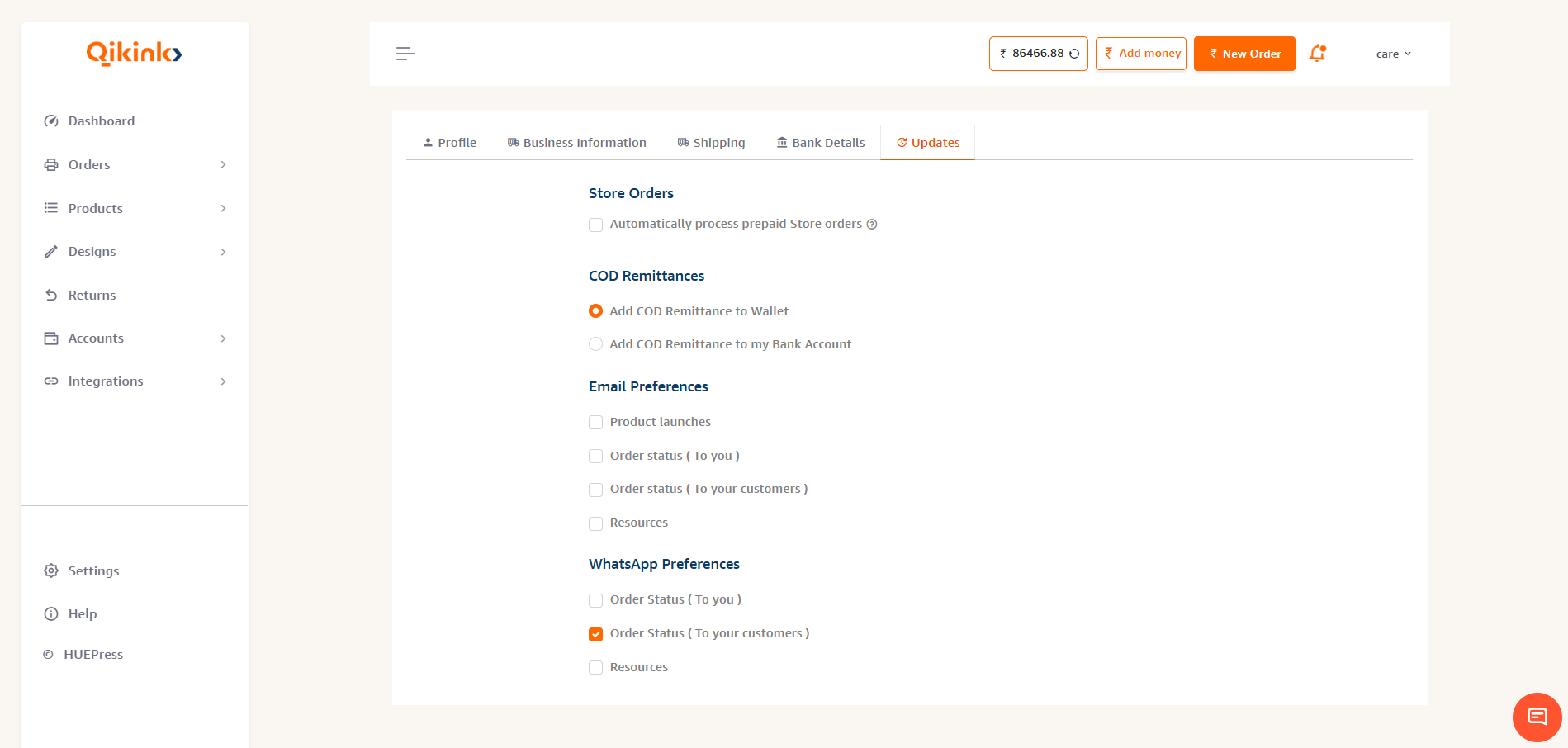
The available preferences are provided separately for Email and WhatsApp notifications.
Email Preferences
Product Launches
If Qikink launches a new product, clients who have enabled this option will receive an email notification about the new product.
Order Status – To You
Clients will receive order-related emails about their own orders, such as order confirmation, Live OOS, order manifested, and order cancellation.
Order Status – To Your Customers
This option is for notifications sent to the end customer regarding their order, such as the order shipped email.
Resources
Clients will receive promotional and informational emails, including resources, updates, and other marketing communications.
WhatsApp Preferences
Order Status – To You
Clients will receive WhatsApp updates related to their own orders.
Order Status – To Your Customers
Shipping-related WhatsApp messages are sent to the end customer, including NDR flow messages when an action is required for a failed delivery attempt.
Resources
Clients will receive promotional and informational WhatsApp messages.
COD Order Notifications
For COD orders, Qikink sends relevant logistics notifications to the end customer through WhatsApp, including NDR flow messages and out-for-delivery notifications, as applicable.
Frequently Asked Questions
Go to Settings → Updates in your Qikink dashboard.
No. Payment-related, action-required, branding order-related, and OTP-related emails are mandatory and are not controlled by the notification preference settings.
The end customer receives customer-facing order notifications such as the order shipped email.
Yes. You can manage the available customer-facing WhatsApp notification preference under Settings → Updates.
NDR messages are logistics notifications sent to the end customer when an action may be required for a non-delivery attempt.
No. The Resources preference controls promotional and informational communications. Mandatory and transactional notifications continue to be sent.
Yes. You can return to Settings → Updates and change the available preferences at any time.
Need help?
If you have any questions or need assistance with your notification preferences, please contact the Qikink support team at care@qikink.com