
How to add credits in Qikink?
How credits work
Qikink charges for the products in the form of credits.
1 Rupee is equal to 1 credit. You need enough credit balance to place your order.
So let's see how to recharge your credits / wallet.
Add credits to your Qikink Account
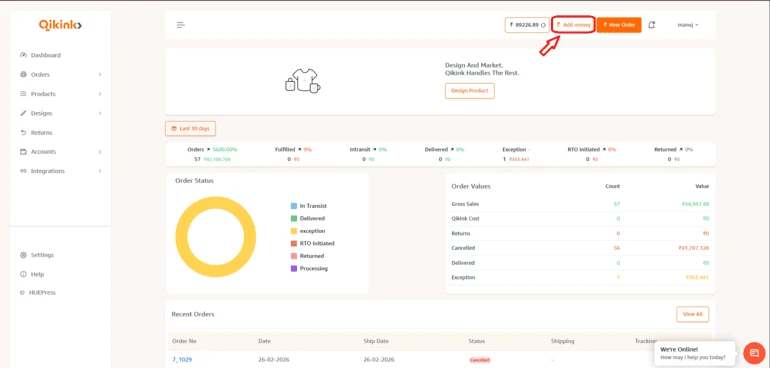
- 1Head over to your Qikink Merchant dashboard.
- 2Click on the Add Money button at the top right corner.
- 1Enter the Amount you want to recharge your account.
- 2Click on Add Payment button.
Note
You can recharge as per your order amount or greater.
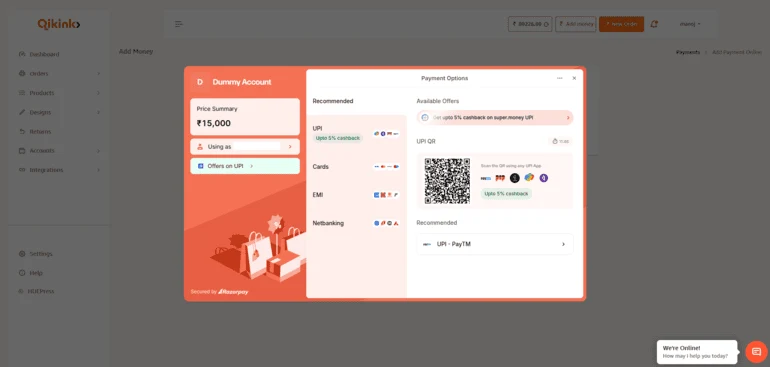
- 1Select your preferred mode of payment among UPI, Net Banking, Card, and more.
- 2Add your Payment Details.
- 3Click Confirm.
Boom! Your account now has sufficient credits to place an order.
You can easily add credits to your Qikink account from international bank accounts using platforms like Razorpay or Wise.com.
International Transactions
For international transactions, the transaction fee automatically deducts from the amount you add to your Qikink account. For example, if you add ₹100 and the fee is ₹3, you will see only ₹97 credited to your Qikink account.
How can you check all your credits?
- 1Go to accounts in your merchant dashboard.
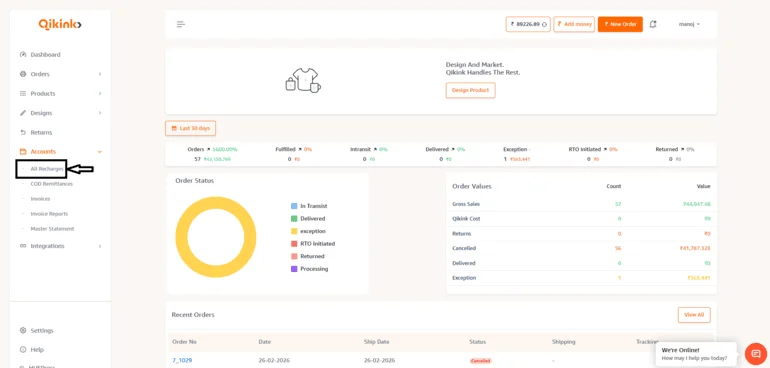
- 1Select All recharges from the dropdown list.
- 2You can add a date filter to check your transactions.
Frequently Asked Questions
In most cases, credits are added instantly after successful payment.
If the amount is not reflected within a few minutes, please check your payment status or contact support with transaction details.
If the amount is not reflected within a few minutes, please check your payment status or contact support with transaction details.
Yes, you can raise a ticket to our support team regarding this, Our team will check and process our credits to your bank account given for COD Remittance.
No, GST won't be charged while adding credits to your Qikink wallet.
Qikink does not charge additional fees for wallet top-ups.
Yes. There is no restriction on the number of wallet top-ups per day.
Yes. If an order is cancelled or refunded, the amount is credited back to your Qikink wallet.
I hope this helped.