
How to Transfer Your Credit Balance to Your Bank Account?
You can transfer money from your Qikink credit to your registered bank account using the Credit to Bank option in your dashboard. A 2% transaction fee and 18% GST on the fee are deducted from the transfer amount.
Alert
Check your bank account number and IFSC code carefully before requesting a transfer. If the details are incorrect, the money may be sent to the wrong account and recovery is not guaranteed.
Before You Request a Transfer
Your bank details must be added and verified before you can transfer money. If they are not, the page shows a message asking you to add or update them, and you cannot raise a request until they are verified.

Click Update Bank Details and add your account details. Follow the steps to update your bank details.
How to Request a Credit-to-Bank Transfer?
Step 1: Log in to your Qikink Dashboard.
Step 2: Go to Accounts > Credit to Bank.
The Request Credit Transfer page shows your available credit balance, the bank account the money will go to, the amount field, a transfer breakdown and your earlier requests.
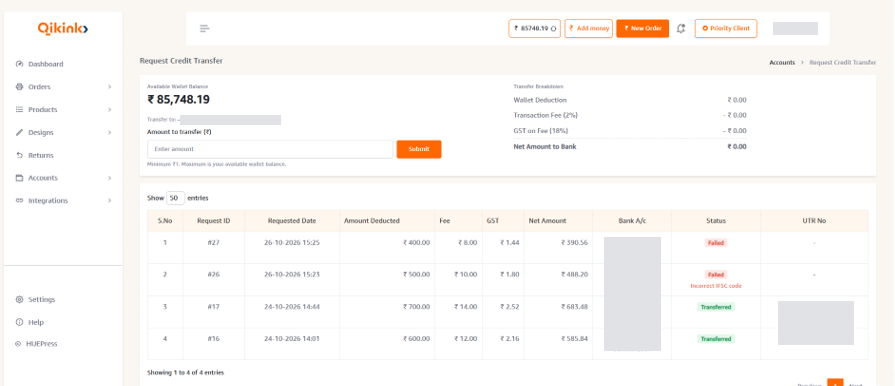
Step 3: Enter the amount in the Amount to transfer (₹). The minimum is ₹1, and the maximum is your available credit balance.
Step 4: Check the Transfer Breakdown on the right. Net Amount to Bank is the amount you will receive.
Step 5: Click Submit.
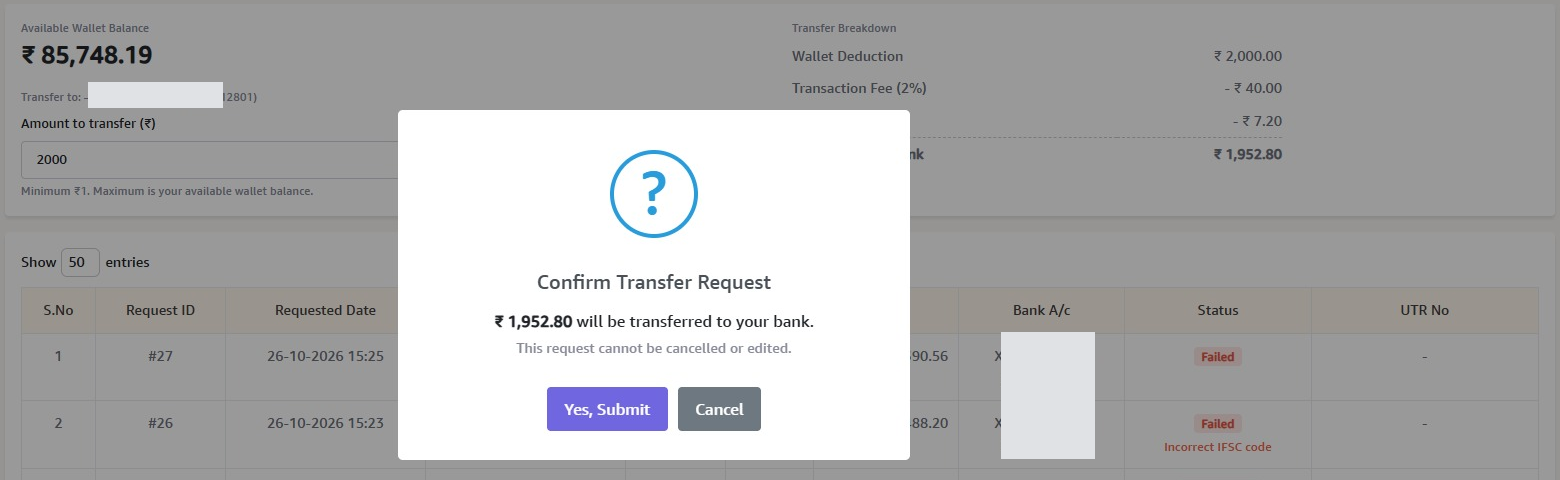
Step 6: In the Confirm Transfer Request box, check the amount and click Yes, Submit.
Alert
A submitted request cannot be cancelled or edited.
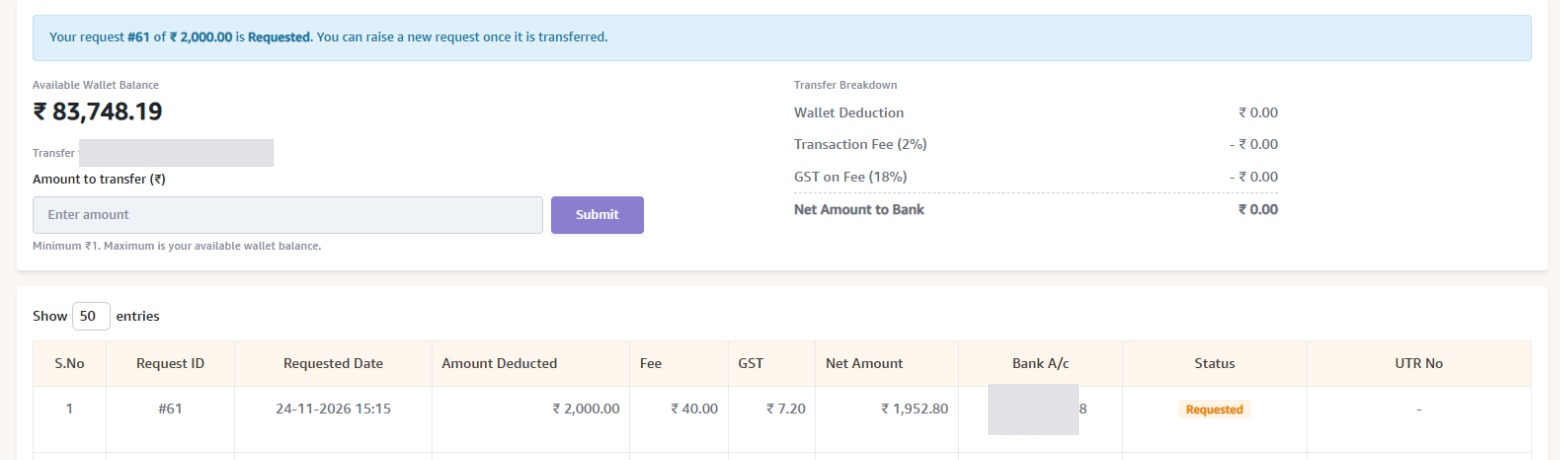
Once you confirm, the amount is deducted from your credit balance, and the request appears in your transfer history with the status Requested. The net transfer amount will be credited to your registered bank account within 4 to 5 days of submitting the request. You can track its status on the same page.
Info
You cannot submit another transfer request while your current request is in progress.
Charges and Net Amount
Two charges are deducted from the amount you transfer:
Transaction fee: 2% of the transfer amount.
GST on fee: 18% of the transaction fee. GST is charged on the fee only, not on the full transfer amount.
Net Amount to Bank = transfer amount − transaction fee − GST on the fee.
For example, if you transfer ₹2,000:
| Item | Amount |
|---|---|
Credit deduction (amount you enter) | ₹2,000.00 |
Transaction fee (2% of ₹2,000) | − ₹40.00 |
GST on fee (18% of ₹40) | − ₹7.20 |
Net Amount to Bank | ₹1,952.80 |
Transfer Statuses
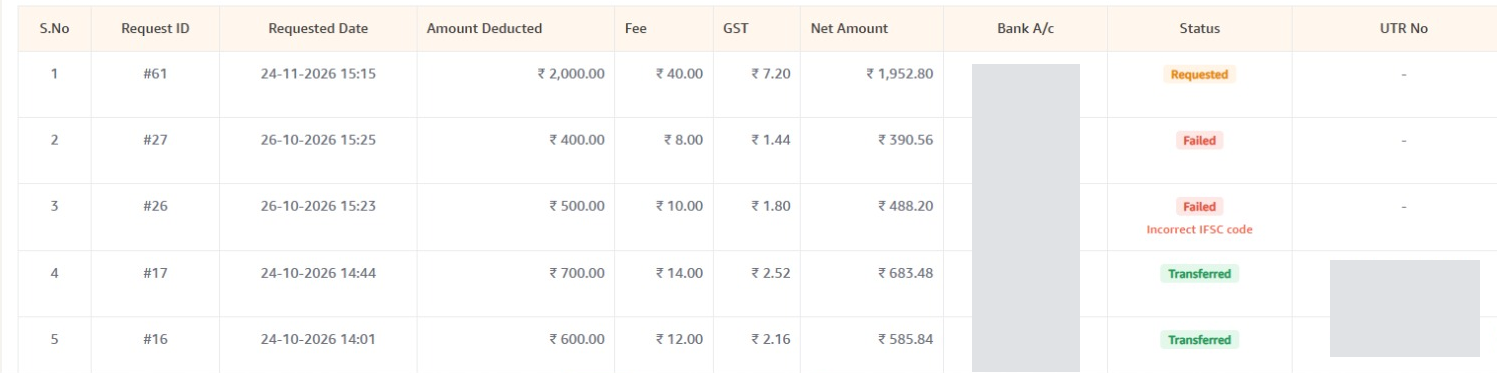
Your requests are listed below the form with the amount deducted, fee, GST, net amount, bank account, status and UTR number.
| Status | What it means | What to do |
|---|---|---|
Requested | Your request is submitted, and the amount is deducted from your credit. | No action needed. You cannot submit another request while this one is in progress. |
Transferred | The money has been sent to your bank account. | Use the UTR (Unique Transaction Reference) number to track the payment with your bank. |
Failed | The money was not sent. The reason is shown below the status; for example, an Incorrect IFSC code. | Fix the issue and submit a new request. |
Email Updates
You receive an email at each step:
- 1
When you submit a transfer request.
- 2
When the amount is transferred to your bank account.
- 3
When a transfer fails, along with the reason.
Common Messages
Amount cannot exceed your credit balance
The amount you entered is more than your available credit balance. Enter an amount equal to or less than your balance.

Your bank details are not verified
Click Update Bank Details, add your correct bank details, and try again once they are verified.
Frequently Asked Questions
The minimum is ₹1. The maximum is your available credit balance.
No. Once you click Yes, Submit, the request cannot be cancelled or edited. Check the amount before you confirm.
No. You cannot submit another transfer request while your current request is in progress.
Check the reason shown below the Failed status, correct it, and submit a new request.