
Where can I check my wallet/credit transactions?
In this article, we will see how you can check all your credit transactions.
But before that, let us learn about what credits balance is and how it works
Credits/money is the amount you recharge to place your orders at Qikink. You need enough credits to place your order on the Qikink Dashboard.
Pro Tip
Every Rs. 1 is equal to 1 credit
Here's how to recharge your credits :
- 1Log in to your Qikink Merchant Dashboard
- 2Click on Add Money button on the top right
- 3Enter the amount you want to recharge
Pro Tip
There is no minimum balance required in your account. You can recharge whenever you place an order.
- 1Select the Payment Mode and click on Add Payment
- 2Complete the payment process.
Hurray! Your payment is added to the Qikink credit. You can use them to place your orders.
Alert
You can view all your Recharge history in your Dashboard > Accounts > All Recharges
Now, let's dive in to see how to check your credit transactions/history
Alert
You can view all your wallet transactions like the amount deducted for orders, order cancelation refunds, defective order refunds
- 1Log in to your Qikink Merchant Dashboard
- 2Go to Accounts > Master Statement
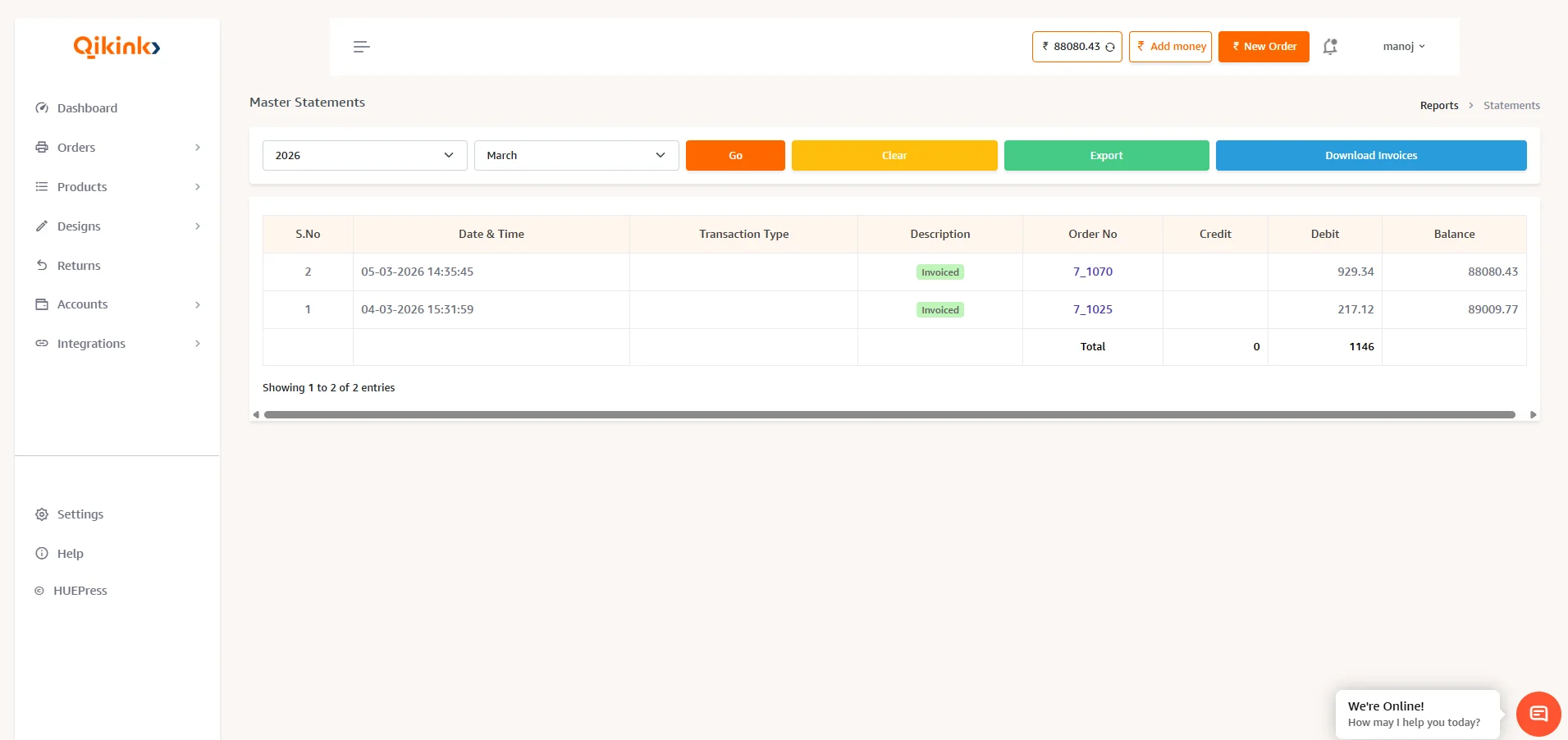
Alert
Return shipping cost and the refund amount will be updated in the debit and credit fields respectively.