
GST Input Tax Credit & How to Claim ITC for Your Business
This applies to you if you have GST registration.
Check the following post to learn more about GST in the business aspect. Our blog will tell you about the basic importance of GST in dropshipping model and how can we implement it effectively.
After getting GST, you need to file returns regularly and pay GST.
Get input GST from Qikink and only pay the difference amount.
To avail of GST credits, all you have to do is,
Update your GST number on your dashboard settings page
Pro Tip
Login to Dashboard -> Settings -> Profile -> Business Details
Once the order is manifested. You can download the invoice against the order.
Go to Accounts -> Invoices, choose the order below Actions
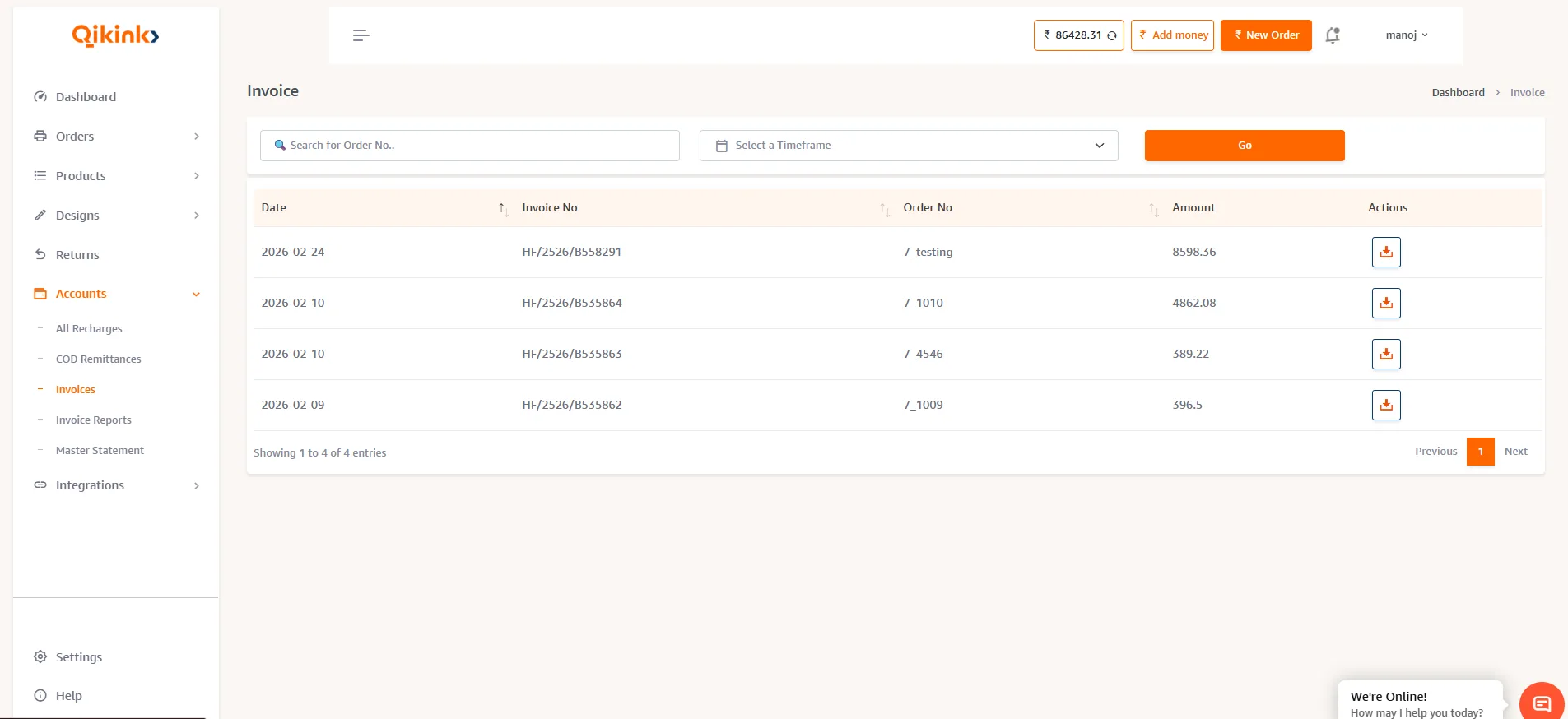
After receiving the invoice, please check if your GST number is updated. If it's not, contact care@qikink.com immediately to have it updated. You can claim input credit only if your GST number is included on the invoice. If your GST number is missing, please inform us within 3 working days of receiving the invoice.
You can download the consolidated invoice for a specific month, such as March, during the first week of April. Simply go to the Account -> Invoice Report page to access and download the invoice for that month.