
How to update my bank details?
You need to update your bank details when enabling COD remittance for your bank account regarding COD orders. The Cash on Delivery (COD) remittance amount will be transferred directly to your bank account.
Alert
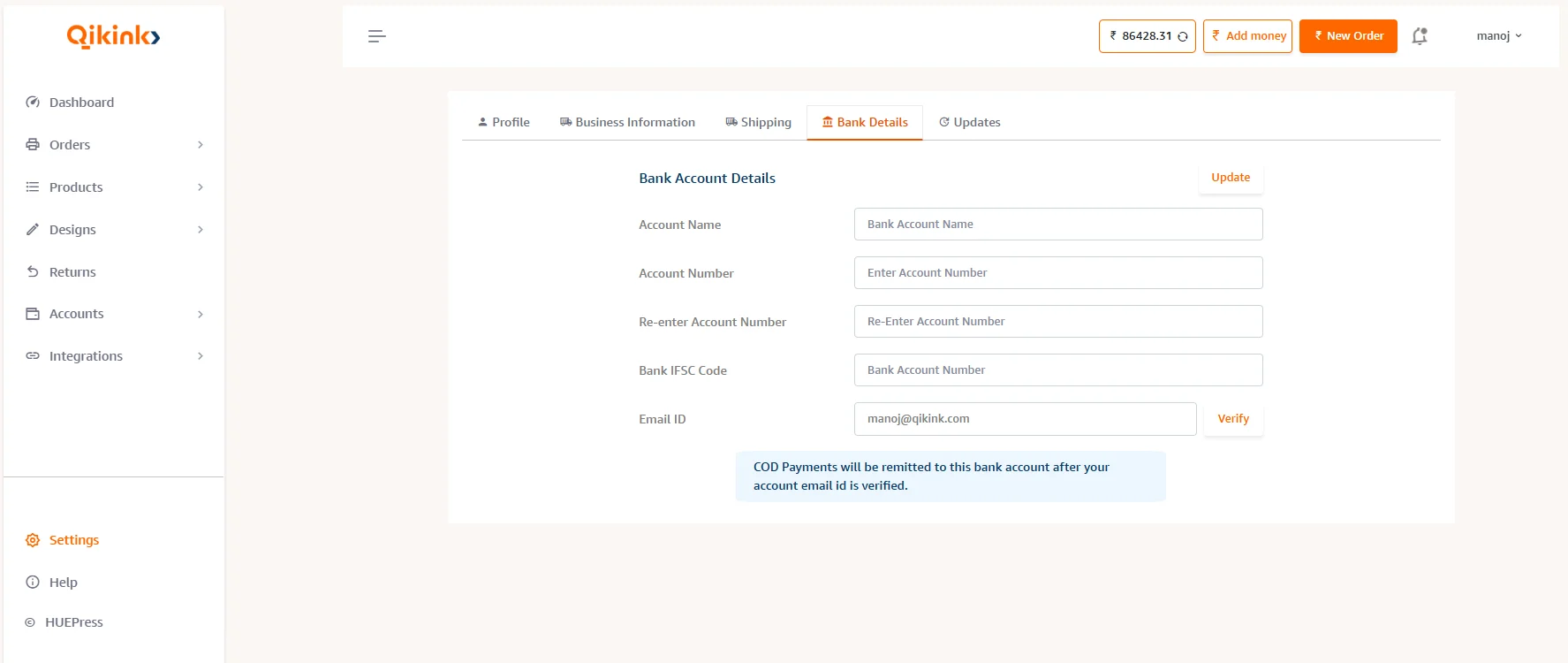
COD Payments will be remitted to your bank account after your account is verified.
Here's how you can update your bank details
- 1Log in to your Qikink Dashboard
- 2Click on Settings.
- 3Select the Bank Details tab
- 4Enter your Bank Account Name as per the bank
- 5Enter your Bank Account Number and Re-enter it exactly
- 6Enter the Bank IFSC
- 7Enter the Email ID
- 8You will receive an OTP on your email ID once you click confirm
- 9Enter the OTP to get the account verified.
Pro Tip
Bank details cannot be edited once saved. If you wish to make changes, please contact us via email care@qikink.com to request the edit option.
Alert
If you provide incorrect bank details and the amount gets transferred to that account, Qikink will not be responsible. However, if the amount gets reversed to our bank account, we will reinitiate the COD remittance once you update the correct information in the merchant portal. The transfer to your updated bank account will take approximately 2 to 3 weeks.