
Looking to sell your products on the most trusted platform, Amazon? But confused about whether it is possible to do it without inventory? The answer is yes. Because of the print on demand business model, you can start selling on Amazon without worrying about storage, as well as packaging and logistics operations.
But how can print on demand help with Amazon selling? In this blog guide, we will explore why Amazon is the best platform and how to implement the print on demand service with Amazon, providing step-by-step instructions.
Key Takeaways:
- Amazon is a trusted, verified, and one of the largest e-commerce platforms that helps you sell your print on demand products.
- Amazon Print on Demand India is gaining popularity, and entrepreneurs have already begun their startups using the Merch on Demand and other services provided by the Amazon Seller Platform.
- An Amazon Seller account offers you various tools that are not available with a basic individual account.
- Creating your design and choosing the right product to sell is as essential as marketing and promoting your product for sale.
- Following the step-by-step guide and the tips to remember, and adapting the business model well, will help you reach new heights.
Why Amazon?
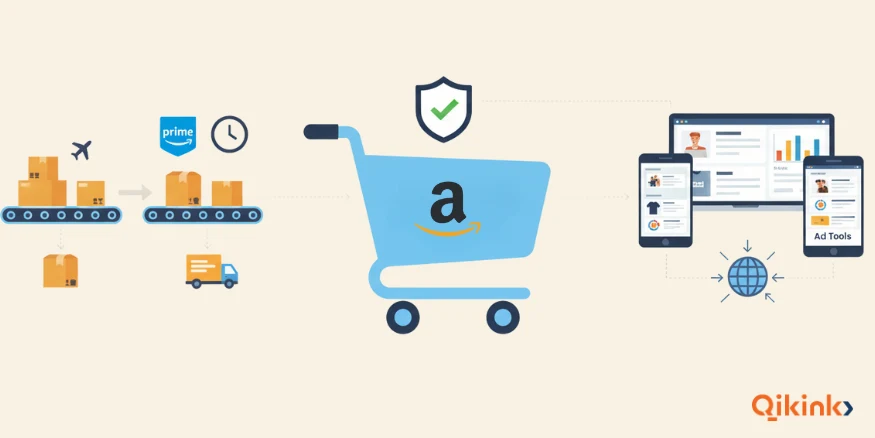
Amazon is the largest e-commerce marketplace globally, founded in 1994. As of today, there are around 10 million registered sellers, with nearly 2 million actively selling their products through the Amazon Seller Central platform.
Sellers benefit from the Amazon Fulfilment services (FBA – Fulfilment by Amazon), which provide shipping, delivery and customer support directly from Amazon. The FBA also grants you a Prime Badge, which customers prefer most, and also enables same-day or next-day delivery to your customers.
The Fulfilment by Merchant (FBM) is also an option when the seller chooses to manage their own inventory and delivery process. This ensures full control over the operations, and you can also combine this with an FBA business strategy for more effective selling.
The Amazon Seller Central dashboard is a professional platform that enables you to manage your product listings, track sales, and more. Additionally, Amazon’s ad tools help to increase the visibility of your brand.
What is Amazon Print on Demand?
Amazon print on demand allows sellers to offer custom-printed products without maintaining large stocks of finished inventory. Sellers can use Amazon Merch on Demand, where Amazon handles printing and fulfilment, or list products through Amazon Seller Central and arrange production through a third-party print-on-demand provider. Integration and order management depend on the service used.
If you use a third-party print-on-demand provider, you can create product listings through Amazon Seller Central and arrange fulfilment according to the provider’s supported workflow. Some providers offer direct integrations, while others, such as Qikink under the workflow described in this guide, require manual order processing.
Amazon Print on Demand Revenue Calculator
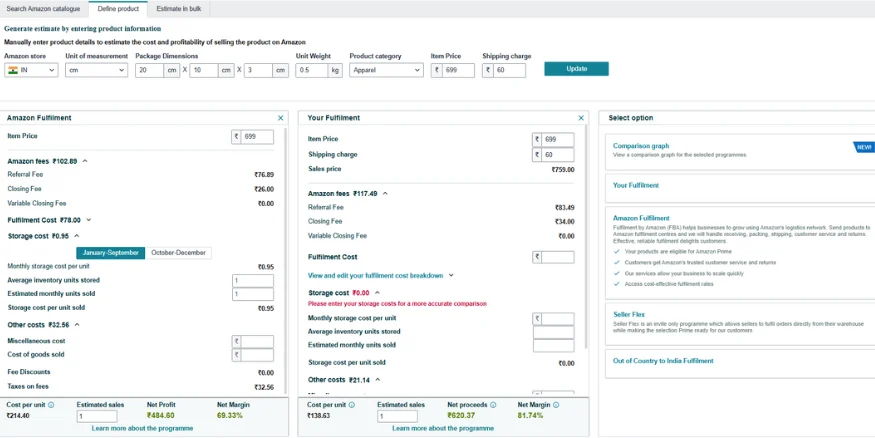
An Amazon revenue calculator is a tool designed to estimate potential profits for Amazon sellers from your fulfilment costs and also real-time cost comparisons between different fulfilment methods.
Select your country, enter the cost estimates such as product price, shipping costs and others and get your estimated profit calculated. Many third-party tools offer more advanced features, but Amazon also provides its own basic “FBA Revenue Calculator” for sellers.
How to Sell Print on Demand on Amazon
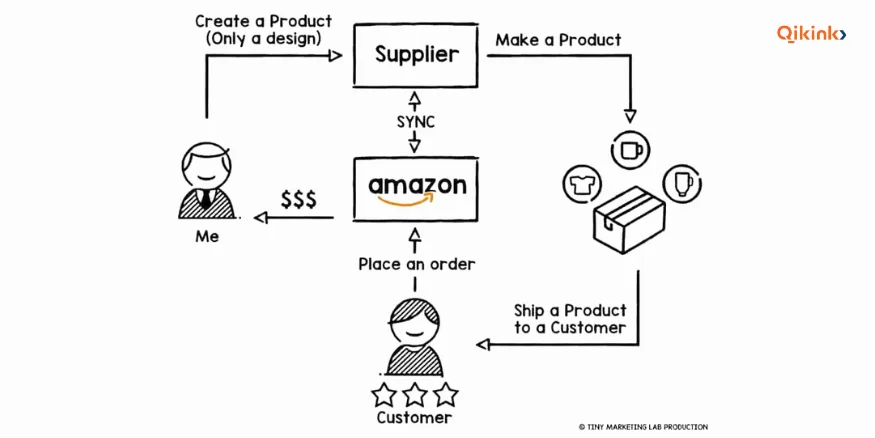
As said earlier, you can either begin your own Amazon seller account or integrate any third-party print on demand services with Amazon and begin selling your product. So, the next immediate question is: How do you create your Amazon seller account, how do you sell on Amazon, and how do you integrate your print on demand store with Amazon?
Let’s now discuss the steps involved in starting an Amazon Seller account and moving forward.
Want to know about Selling on Etsy?
This guide explains how Etsy POD works and how to build a scalable store
Etsy Print on Demand →
Step 1: Create Amazon Seller Account
To sell print-on-demand products on Amazon India, register through Amazon Seller Central. You will need the required business and tax details, an active bank account and a suitable fulfilment method. Once registered, you can create product listings, manage orders and access available seller tools.
Amazon India charges selling fees based on factors such as product category, selling price and fulfilment method. These may include referral fees, closing fees, shipping charges and other applicable costs. Check the latest charges on Amazon India’s official seller pricing page before calculating your print-on-demand selling price.
To start selling print-on-demand products on Amazon India, create your Amazon Seller Central account and complete the registration process using the steps below.
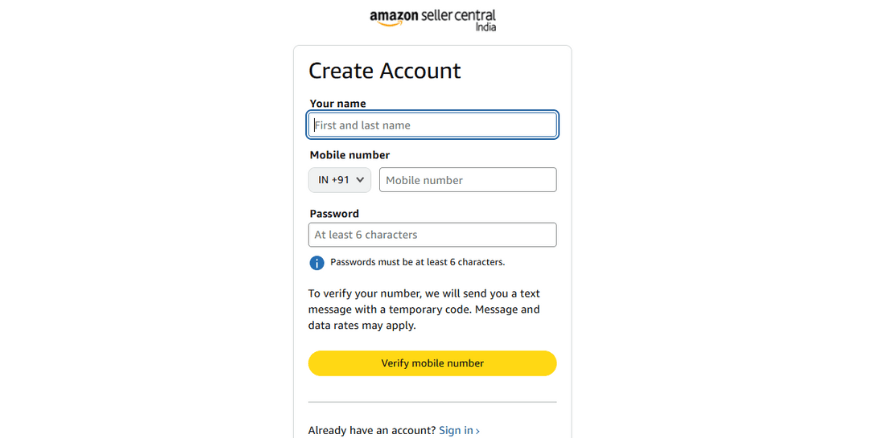
- If you have a customer account on Amazon Prime, use the same email and password to log in to your seller account. If not, click on ‘Create your Amazon account’, enter your details, and set up a password.
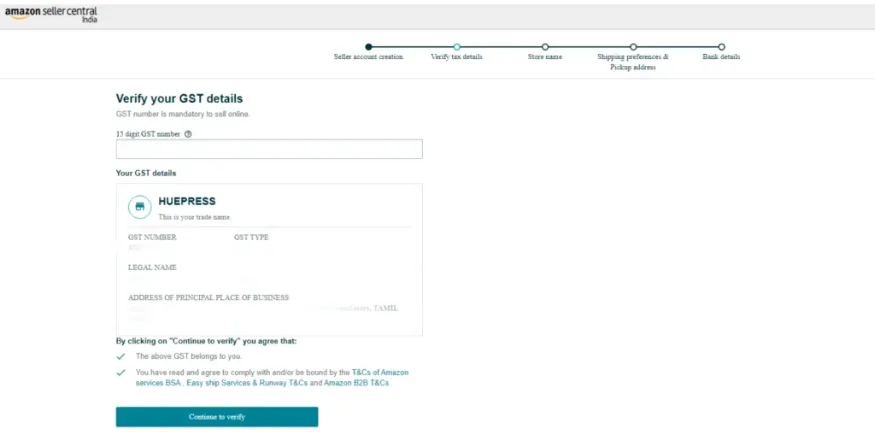
- Enter your GST number, move to the next tab and verify your business firm’s GST number.
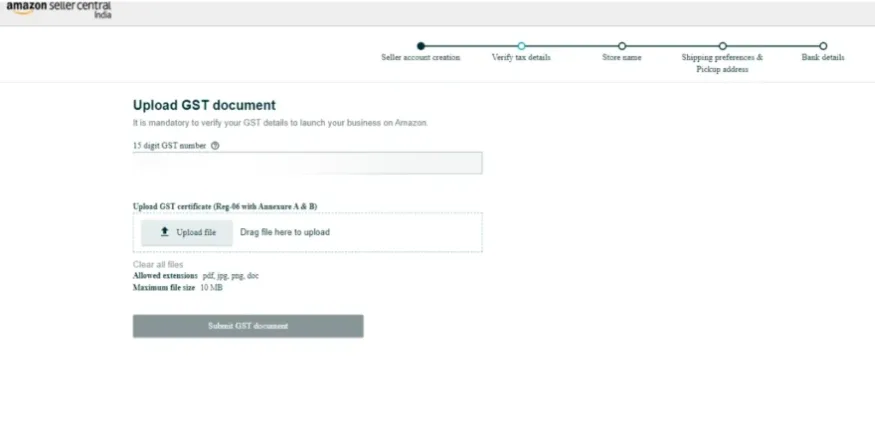
- You will need to upload the GSTIN certificate. The documents can be in PDF, JPG, or DOC format and should be less than 10 MB. After uploading the documents, click on the ‘Submit GST document’.
- This GST verification can take up to 72 hours. While your certificate verification is being reviewed, you can proceed with the remaining steps in the registration process.
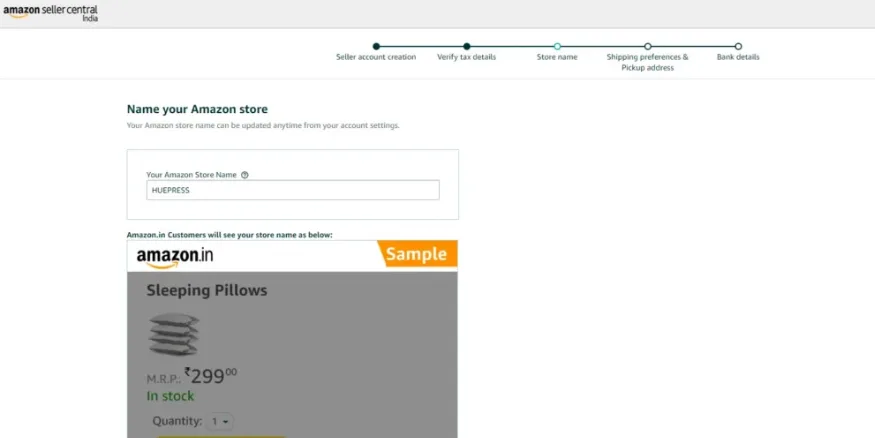
- Name your brand or identity for your Amazon store, which should be unique and effectively summarise your products and brand. You can also opt for the auto-generated names from Amazon.
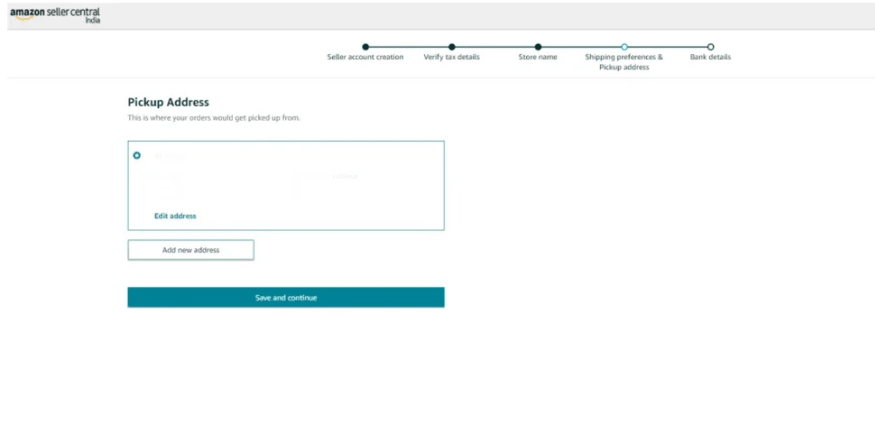
- For shipping preferences and pickup, the address from the GSTIN certificate can be filled, so ensure the address is correct. If you want another address to be your pickup address, you can select ‘Add New Address’ and enter it manually.
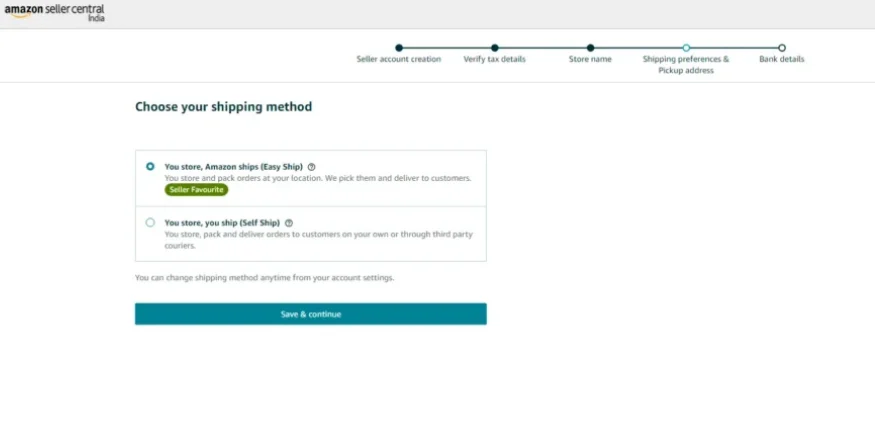
- Choose your shipping preference here: either Easy Ship or Self Ship.
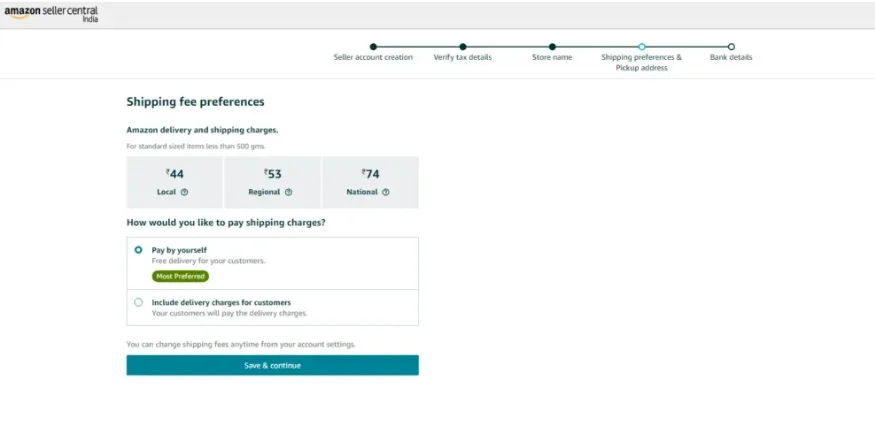
- You can choose to include delivery charges with the product price and offer free delivery to customers. Or you can enable separate delivery charges.
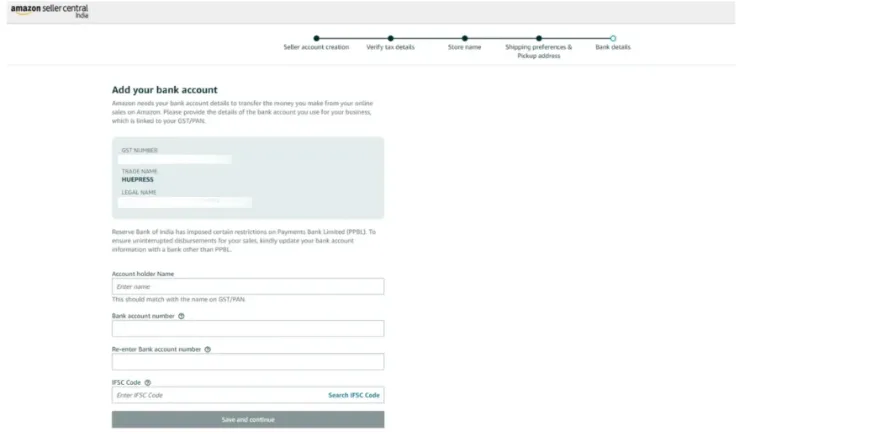
- Provide your active business bank account details so Amazon can transfer your eligible sales proceeds after deducting applicable seller fees and charges.
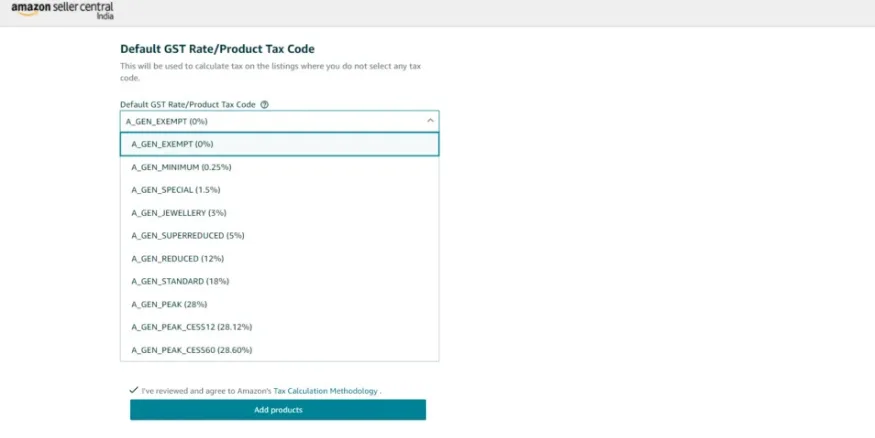
- The default GST rate or the Product Tax Code (PTC) is the government-notified tax rate for each product category. It applies to product sales when no specific tax code is selected, ensuring the correct tax percentage is used.
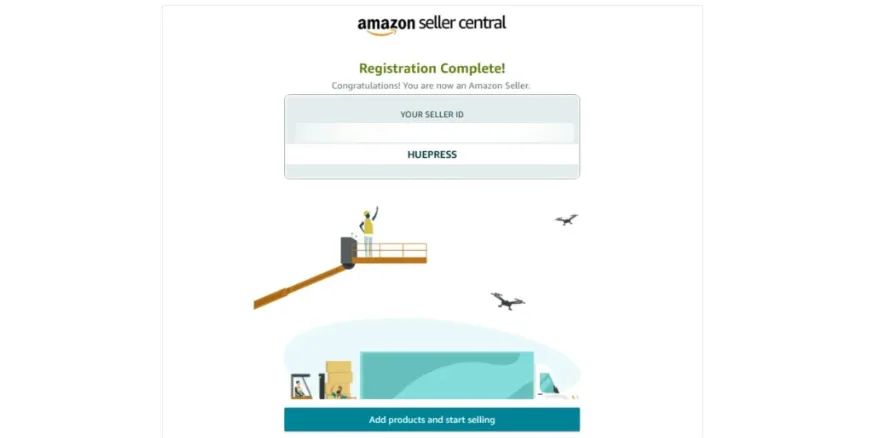
- The registration is completed. You are now ready to go by clicking ‘Add Products and Start Selling’.
An Amazon Seller account is a hub, not only for selling your favourite products, but it also provides various personalised tools that allow a broader audience to reach your products.
Step 2: Choose Print on Demand Services
Choose a print-on-demand service based on how you plan to sell products through Amazon. Amazon Merch on Demand is Amazon’s own programme, where eligible creators upload designs and Amazon manages printing, fulfilment and customer service. It is not a tool for integrating third-party print-on-demand platforms with Amazon Seller Central.
A print on demand business model enables sellers to enter the e-commerce market with fewer operational complexities and lower financial risks. From t-shirts to hoodies and other accessories, this print on demand service offers a variety of products for sellers to choose from.
If you choose to sell through Amazon Seller Central, you can work with a third-party print-on-demand provider to produce and fulfil customer orders. Some providers support direct Amazon integration, while others require sellers to manage orders manually.
In India, print-on-demand providers like Qikink help sellers create customised products without maintaining inventory of finished goods. Qikink offers a range of products that sellers can personalise with their own designs and fulfil through a manual Amazon order workflow.
Step 3: Design or Create a Mockup Online
You have your platforms ready and have set up your print on demand stores for selling your products on Amazon. However, you also need to consider selecting the best design software, which can make your design stand out.
Several other tools could help design your products. There are various AI image generators available through which you can create your own designs or draw inspiration. When making a design, ensure that you balance your audience’s needs and market trends to achieve success.
Numerous ideas, designs, and mockups are available to get started. Hence, to start an Amazon print on demand India business, you don’t have to be a graphic designer; you can get help from these tools and fulfil your customers’ wishes.
Designing for your product is the first step of your business, but simply designing and creating mockups doesn’t always help you sell your products. Maintain consistency in designing your artwork, choose products that best suit it, and promote it effectively to see your profit graph rise.
Step 4: Select and List Products on Amazon
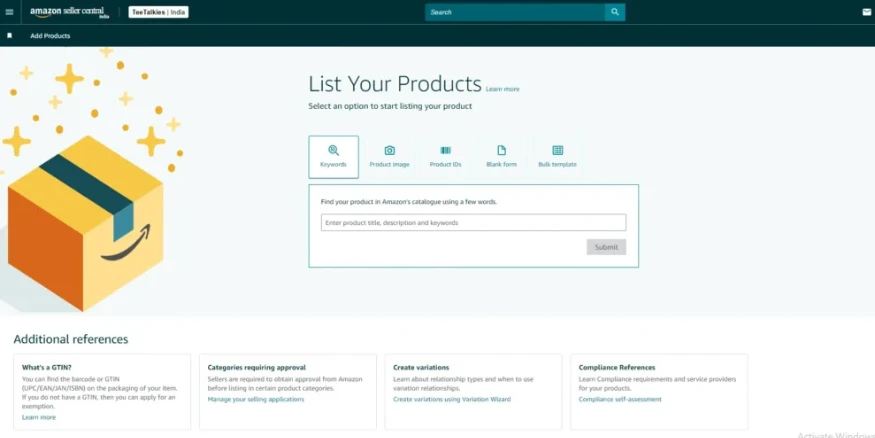
Once you’ve found a way to present your designs and mockups, it’s essential to choose your product and decide how and where your design will be displayed. Qikink offers a range of new products and categories, from which you can select your favourite. To add new products to your Amazon Seller store,
- Log in to your Amazon Seller Dashboard, navigate to Catalogue in the main menu and click ‘Add products’.
- To add a new product, choose the new product adding option, and for existing products, use the Amazon Standard Identification Number and sell that product.
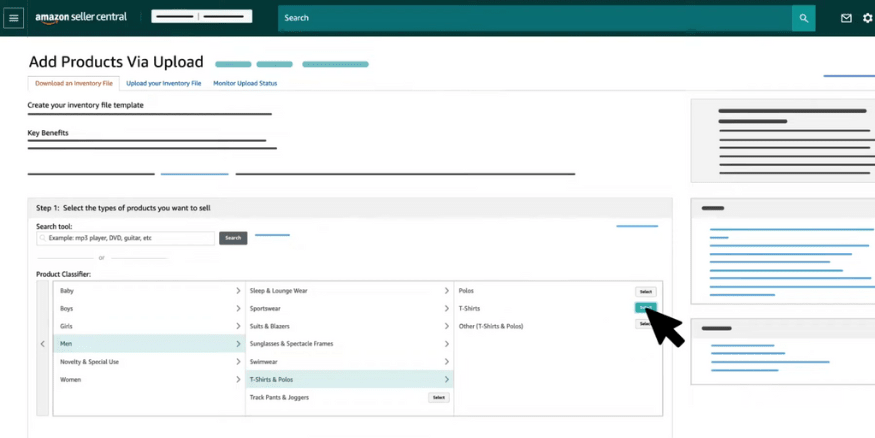
3. Select your product’s category and list it accurately.
Source: Sell on Amazon India (YouTube)
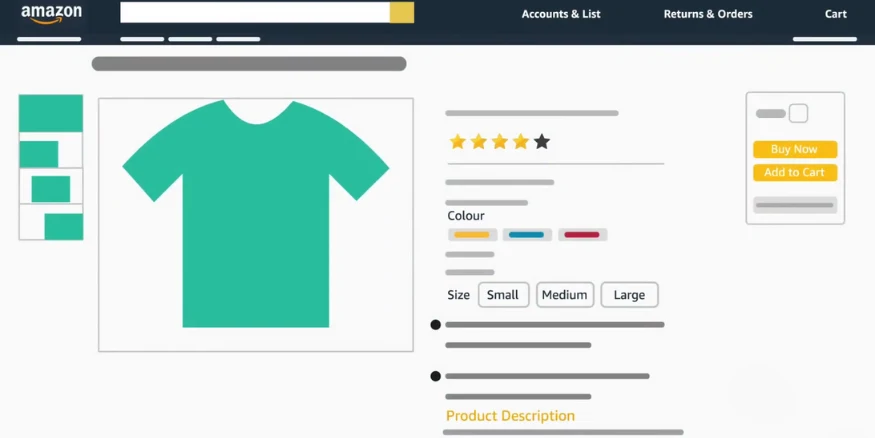
4. Complete all the required information and tabs in the Advanced View, including product title, description, keywords, images, pricing, and other relevant details, to complete listing your product.
After listing your product, several key considerations should be kept in mind when adding the product details.
- The title of the product has a maximum of 200 characters, and the first letter must always be capitalised.
- Add 6-8 images, and ensure the main product image quality is at least 1000 x 1000 pixels, which enhances the overall quality of your product listing.
- Make sure to add the variations of the product, such as colour, size and others.
- The most important thing for customers to find your product is an SEO-optimised description, up to 2000 characters and key features that highlight your product’s benefits.
- Using keywords closely related to your product is recommended to market it in the store effectively.
- Different sellers may also offer the same product as yours, and that’s where Amazon combines all of these products on a single page, along with their prices and offers, making it easy for customers to purchase the specific product.
Try uploading a bulk of products to the store for listing. You can either upload brand-new products or select already listed products from Amazon, or choose your existing products and add them to the cart.
Amazon Selling Policies
For every product uploaded to Amazon, it creates an ASIN (Amazon Standard Identification Number), a 10-digit number specifically denoting your product, which you can use to organise and track it on Amazon for reaching international marketplaces.
Apart from these, ensure you follow all Amazon product safety and restricted product policies to avoid any issues in the future. Also, if your product comes under the guidelines of the Amazon Brand Registry, the product can only be listed by,
- The legal owner of the product or the brand.
- Other sellers who are directly connected with the brand.
- Third-party sellers who are somehow associated with the brand.
When reselling those products, the sellers should complete a brand selling application and compete with the product by offering the price, terms, and shipping costs.
Amazon Print on Demand Pricing
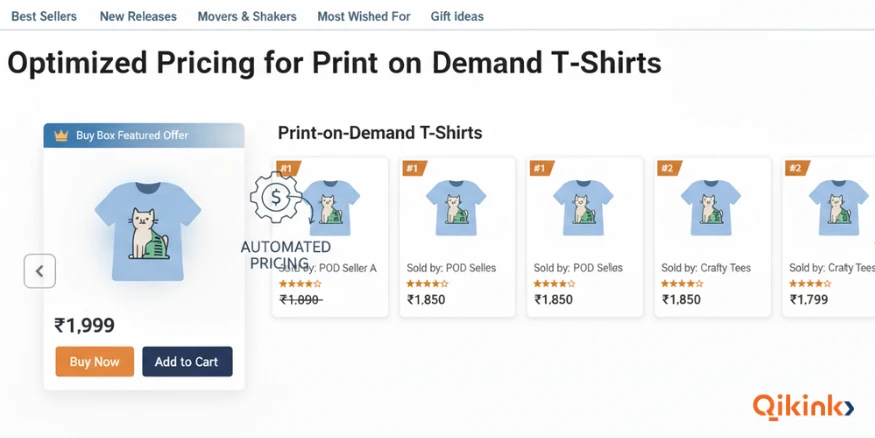
Amazon makes it easy for customers when multiple sellers offer the same product; they can compare the product based on the price and cost mentioned by each seller. That’s why, whenever you list a product, you must be careful with pricing the product.
Firstly, when uploading your product to a print-on-demand platform, ensure you accurately calculate the product’s cost, including the effort and profit. If the customer feels the product is truly worth the price, they will purchase it with certainty, which in turn brings in more customers.
Some points you need to keep in mind before setting up the price of your products on Amazon are,
- Compare your product pricing with similar listings on Amazon, but calculate your total costs before deciding on a selling price. Include printing, packaging, delivery, Amazon seller fees and other applicable expenses to understand your potential profit margin.
- Amazon’s Featured Offer, previously known as the Buy Box, allows customers to purchase products directly through the Add to Cart or Buy Now buttons. Eligibility depends on factors such as competitive pricing, delivery performance, product availability and seller account performance.Amazon sellers should also maintain healthy Account Health metrics, including:
- Order Defect Rate: Below 1%.
- Cancellation Rate: Below 2% for seller-fulfilled orders.
- Late Shipment Rate: Below 2% for seller-fulfilled orders.
- Valid Tracking Rate: Above 95% for applicable seller-fulfilled shipments.
- Most of the time, even the Amazon platform provides the least-priced products at the top when that particular product is searched.
- Amazon Professional Seller accounts offer an Automated pricing tool for their users, which helps set rules once for their products and systematically set prices, with the Buy Box and other features enabled.
After selecting the perfect products that align with your design and listing them in the ideal state, following Amazon’s guidelines will help you sell your print-on-demand products legally and securely using the Amazon seller platform.
Step 5: Managing, Marketing and Promotion
The step-by-step process stops when you list your product on your store. But you might have heard the term ‘finishing touch’. That touch completely changes a perspective from ‘good’ to ‘better’.
Whenever a product from your store is sold, ensure that you gather genuine feedback from your customers, which will help you attract new customers. On your seller platform or social media pages, collect reviews of your product and service to improve further.
Likewise, from creating an account on the Amazon Seller platform to listing and pricing your product, the steps are complete; however, you still need to manage your sales, track which products are best-selling, and consistently work on them to earn further profit.
From choosing your print on demand platform to the delivery process, it should be feasible, and your customers must post only positive feedback; that is what gives you the rise you expect.
Shipping and Delivery Process
When it comes to the managing stage, the first responsibility is to ship the product to your customer safely. Always ensure that every product reaches your customer safely, regardless of the business method you choose: Fulfilment by Amazon (FBA), Fulfilment by Merchant (FBM), or you handling the charge yourself.
When choosing a print-on-demand fulfilment service like Qikink for selling your products online, and combining it with the most trusted Amazon as your store, you get the perfect partnership in your business.
Amazon Search Engine Optimisation

Search Engine Optimisation is a process that increases your website’s visibility and traffic naturally through the results from search engines like Google. It uses complex algorithms to rank the most visited and viewed pages at the top for a particular search result.
Amazon search engine optimisation helps sellers rank their products at the top and also enables customers to find the products they are actually searching for in one attempt. Amazon’s search engine utilises keywords in the titles and descriptions of products.
By using the right keywords, trending product titles, and apt descriptions, you can organically increase traffic and market to your Amazon store, and by following these for all your products, they can rank in the top through the SEO tools and can strengthen your store’s sales.
Amazon SEO is just one tool among the numerous marketing tools available in the Amazon Seller App. Combining the right tools in the perfect situation can help your business shine.
Social Media Promotions
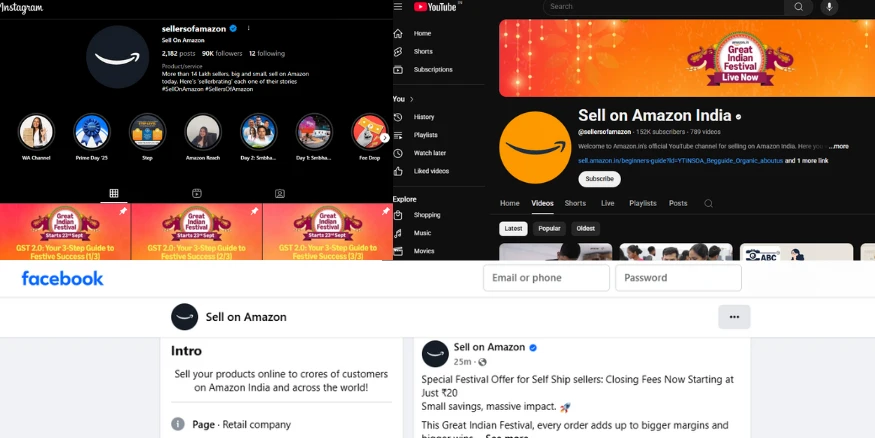
Social Media for business promotion is now the most effective marketing strategy, aligning with the current media-saturated world. There are several ways to use social media to promote an online store.
The top social media platforms, which help sellers stay one step ahead of the others, are,
- Instagram is now the eye-catching display social media app, featuring high-quality images, videos, and ads. Through your Instagram online selling page, you can mention your store’s direct link in the bio, collaborate with other influencers and create quality ads for your store through the Reels feature.
- Facebook is the oldest, yet the most powerful tool for promoting your online store. Create a page for your brand and post regular updates to keep your audience engaged and informed. Utilise the Facebook Ads feature to drive traffic to your product listing page on Amazon.
- By creating a channel for your brand, you can effectively sell your print on demand products from Amazon by adding merch products on YouTube. After achieving monetisation and other access from YouTube, you can directly add the product store link to your videos. Additionally, you can also create videos of your product and turn them into customers.
By following these tailored steps, which align everything perfectly with your business style, you can achieve excellent results in starting and selling your print-on-demand products on Amazon, using the Amazon Seller App, and leveraging the assistance of Qikink.
Popular Selling Custom Designs
Learn practical steps to design and sell products to scale & succeed
Create Designs for Print on Demand →
Amazon New Seller Tips
When you are new to the Amazon selling platform, you cannot expect success to come and knock on your door on the very first day. But remember, ‘Hard work never fails.’ So, plan your strategies accordingly to lead you down the path to success.
Here are a few tips for every aspiring and experienced seller to start and sell products on Amazon:
1. Find the Best Selling Design or Niche
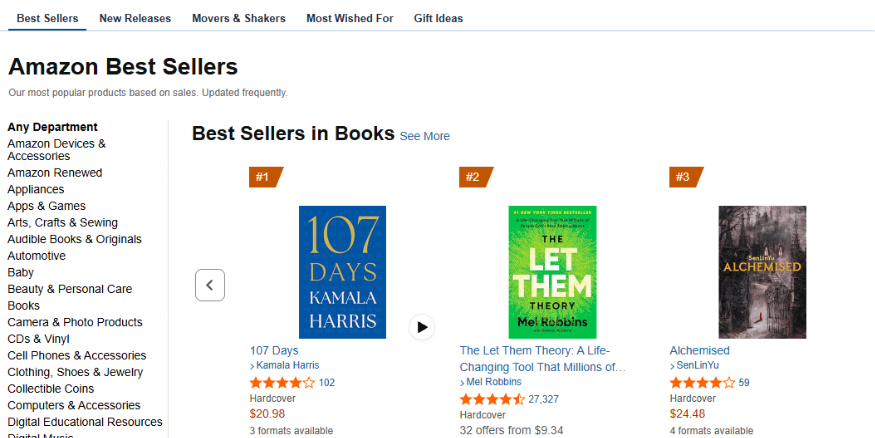
Creating a good design is tough without any ideas. Hiring a freelance graphic designer can add a professional look to your upcoming designs. For example, there are numerous trending design ideas for t-shirts that you can use as inspiration and replicate in your own style, rather than copying them.
Conduct research and polls on your social media pages to gather answers from your community members, and design accordingly to meet their wishes, so your community builds up stronger. Or analyse the market trends and create a niche, assuming it can capture the audience’s interest.
2. Avoid Copyright or Legal Issues
Ensure you read the guidelines provided for the Amazon Seller platform and avoid taking too much advantage of your professional plan. Always respect the Intellectual Property (IP) laws of other sellers and do not copy and paste any design or product descriptions.
Provide your proper tax or GST number and other business credentials during Amazon Seller registration. When registering for the Amazon Brand Registry, ensure you read all the regulations carefully and adhere to them completely.
Keep a record of your documents and invoices, which will be helpful in the near future. Also, avoid using another brand’s identity without any rights. Respond professionally to any infringement warning and handle customers well to maintain a healthy account.
3. Post-Sales Customer Service
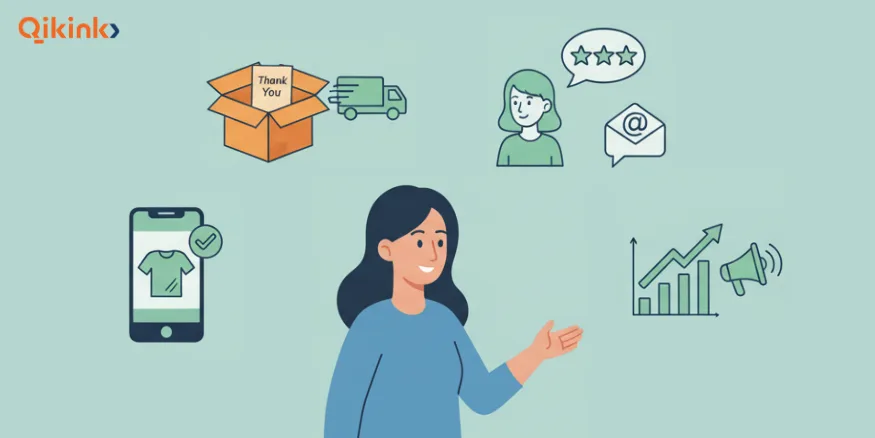
Happy Customers bring Repeated Sales. Always ensure that you treat your customers well, as they trust you and your product, and are willing to spend their money on it. Therefore, it is your responsibility as a seller to ensure they are satisfied.
After they receive their product, email them about the safe delivery and, most importantly, get their reviews of the service. Each review you receive is directly proportional to the traffic your store may attract in the upcoming days; therefore, appreciate every piece of feedback.
Email your regular or high-value customers about updates in the store and the new product launch, keeping them engaged and piquing their interest in continued purchases, which can lead to greater business growth.
If your after-sales service is to be successful, it should start with the packing and delivery. The customer orders your product with the image you uploaded online, which should have been a high-quality file in the first place.
Then, handle the packing with care and send them a thank-you card with the product, ensuring it arrives in good condition. Amazon’s FBA can handle your packing and delivery, or consider signing up with Qikink, which handles the printing, packing, and delivery process with care and is the best solution for a print on demand service.
Choose Qikink as Your Partner
You can start selling products using Qikink with no upfront costs and no storage requirements. You can upload your design to the Qikink dashboard and choose a product of your own choice or select from high-demand products that are sold more frequently online.
Steps to Sell on Amazon with Qikink
Qikink does not currently offer automatic direct integration with Amazon, according to the existing workflow. However, you can use Qikink to produce custom-printed products for orders received through Amazon Seller Central by managing the order process manually.
- Sign up for Qikink and start creating your designs using the numerous tools and software available, then upload them to the Qikink dashboard.
- Choose from the numerous products, ranging from apparel to accessories, available on Qikink and add your designs to the products.
- Create your product listings separately in Amazon Seller Central. Set your selling price after considering Qikink’s product and fulfilment costs, Amazon seller fees and your expected profit margin.
- Choose Self Ship in Amazon Seller Central if it is suitable for your fulfilment arrangement and meets Amazon’s current requirements.
- When a customer places an order on Amazon, manually create the corresponding order in your Qikink dashboard using the correct product, design and customer details.
- Coordinate printing, packing, shipping and tracking with Qikink according to the fulfilment services available for your account. As the Amazon seller, you remain responsible for meeting Amazon’s delivery and customer service requirements.
With Qikink as your print-on-demand fulfilment partner, you can manage custom product production without maintaining inventory of finished products. Ensure your order processing and delivery arrangements meet Amazon’s seller requirements.
Know About the Business Statistics
Read about the POD revenue, highlighting growth and insights
Print on Demand Market Size →
Final Thoughts
After understanding the first and foremost steps involved in starting and selling products on Amazon, you will now be even more confident to take the next step and begin your own startup business. Whether you are an entrepreneur or an experienced professional in this field, this guide will help you elevate yourself and gain more knowledge in this area.
Whether you choose to sell with Amazon as a merchant to control your logistics, or partner with a third-party print on demand service like Qikink for hassle-free inventory and logistics, your success is not far away when you implement the steps and remember the essential things.
So, why wait? Start your Amazon Seller account and sell your print on demand products through Amazon, earn profits and establish your own brand identity.
Read More
- What is Print On Demand: A Clear Explanation
- Use Freepik for Print on Demand: Legal Guide
- Wix Print on Demand: How to Set Up and Sell
- Print On Demand Marketing Strategies Online
- Best Print on Demand Courses: Learn & Grow
Frequently Asked Questions
1. Can You Sell Print on Demand on Amazon?
2. Is Print on Demand allowed on Amazon?
3. Is Print on Demand on Amazon Profitable?
4. What types of Print on Demand products can I sell on Amazon?
5. Is there a Cost associated with using Amazon POD Services?
Share the Article


