

You can sell on Meesho without Goods and Services Tax (GST) registration by signing up as a non-GST seller with an Enrolment ID from the GST portal instead of a GST Identification Number (GSTIN). This route is meant for small sellers of goods and applies only when you sell within your own state and stay under the sales limit Meesho states.
It suits home-based sellers, small shop owners and first-time sellers who want to test products in one state before registering for GST. Meesho’s limit is a platform figure, and your eligibility under GST law also depends on your state, your total turnover and the products you sell.
This guide explains how selling on Meesho without GST works, how to get an Enrolment ID, how to register and list your first product, which rules apply, and when you need a GSTIN.
Key Takeaways:
- Meesho accepts an Enrolment ID in place of a GSTIN, but only for goods sold within the state associated with that ID.
- Meesho counts your total annual net sales on the platform and elsewhere against its limit of ₹40 lakh (₹20 lakh in northeastern states).
- An order from another state or sales above the limit are common reasons to switch to a GSTIN.
- Meesho shows these sellers’ products only to customers in their own state, so demand comes from one state.
Can You Sell on Meesho Without GST?
Yes, eligible sellers can sell on Meesho without a GSTIN by registering with an Enrolment ID. This is a conditional exemption, not a general rule allowing every unregistered business to sell taxable goods through any marketplace.
Notification No. 34/2023-Central Tax, effective from October 1, 2023, provides an exemption from mandatory GST registration for qualifying suppliers of goods selling through an e-commerce operator, which is a marketplace such as Meesho. The exemption is subject to conditions, including that the seller:
- Does not make inter-state supplies of goods, which means no sales to customers in another state.
- Sells goods through the operator in only one state or Union Territory.
- Stays within the turnover threshold for GST registration.
- Holds a Permanent Account Number (PAN) and obtains an Enrolment ID through the GST portal.
- Meets the other conditions in the notification.
Registering on Meesho does not by itself confirm that you qualify for the legal exemption, so check your turnover, state and products before using this route.
Is Selling Without GST Possible?
Explore turnover, limits, enrolment route, exempt products & steps to start
Sell Online Without GST →
What Is an Enrolment ID?
An Enrolment ID is a number issued through the GST portal to an eligible unregistered seller of goods on an e-commerce marketplace after the seller’s PAN is validated. The GST notification calls it an enrolment number, and Meesho’s seller page also calls it a UIN.
How Is an Enrolment ID Different From a GSTIN?
A GSTIN is the registration number of a GST-registered seller. An Enrolment ID is not one, so you cannot charge GST to customers or claim input tax credit (ITC), which is credit for the GST paid on business purchases. In practice, any GST included in your business costs stays part of your cost.
Meesho also accepts a composition GSTIN, a simplified option for small businesses that pay tax at a fixed percentage of turnover and cannot claim ITC. The table compares the three account types on Meesho.
| Feature | Enrolment ID | Composition GSTIN | Regular GSTIN |
|---|---|---|---|
| Where you can sell | Your registered state only | Your registered state only | All of India |
| Yearly sales limit stated by Meesho | ₹40 lakh (₹20 lakh in northeastern states) | ₹1.5 crore (₹75 lakh in northeastern states) | No limit stated |
| Charge GST to customers | No | No | Yes |
| Claim ITC | No | No | Yes |
| Tax collected at source (TCS) by Meesho | Not collected | Collected (Notification No. 36/2023-Central Tax) | Collected under Section 52 |
| How you get it | Enrolment on the GST portal | GST registration | GST registration |
Meesho does not collect TCS on supplies by sellers with an Enrolment ID under Notification No. 37/2023-Central Tax, but it reports those supplies in Form GSTR-8, the return that e-commerce operators file.
How to Sell on Meesho Without GST?
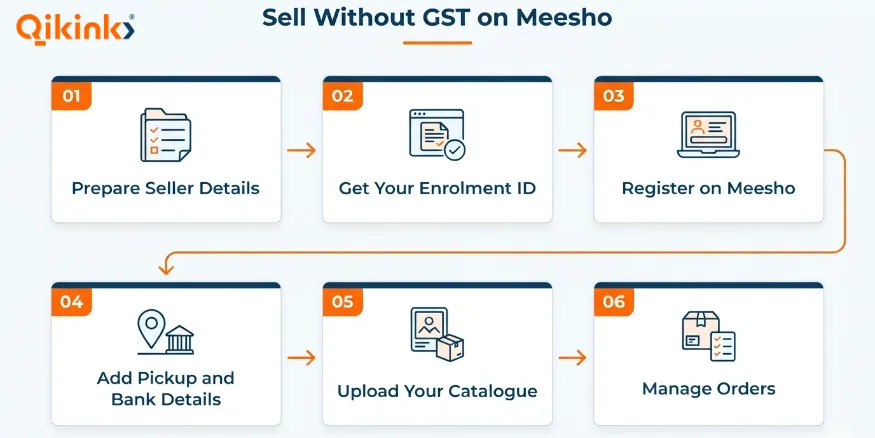
Selling on Meesho without GST involves six steps, from preparing your details to managing your first orders.
Step 1: Prepare Your Seller Details
Meesho’s seller page lists an active bank account and an Enrolment ID as the two requirements for sellers without a GSTIN. The details below are what you will usually need to complete sign-up.
- PAN details.
- An active mobile number and email address.
- A bank account for receiving seller payments.
- Your business and pickup address.
- Accurate product information, images, and pricing for your catalogue.
Keep your PAN, bank account name and address details consistent, because mismatches can delay verification.
Step 2: Obtain an Enrolment ID Through the GST Portal
The Goods and Services Tax Network (GSTN) added the enrolment facility to the GST portal in October 2023. These steps follow its advisory dated October 12, 2023:
- Open the GST portal.
- Go to the User Services tab and select Generate User ID for Unregistered Applicant.
- Click Yes on the warning window that asks if you want to continue.
- Tick the box labelled “To apply as a supplier to e-commerce operators”.
- Fill in the form that opens with your PAN, the state where you operate and the address of your place of business.
- Submit the form. The portal generates your Enrolment ID once your PAN is validated.
You must have the ID before making supplies through Meesho. The notification allows only one per State or Union Territory. Save it somewhere safe, because you will enter it during Meesho registration.
Step 3: Register on the Meesho Supplier Panel Without a GSTIN
Go to the Meesho Supplier website, select Start Selling and verify your mobile number. When the form asks for tax details, select the option for sellers without a GSTIN and enter your Enrolment ID. Sign-up is free, and you can complete the rest of your seller profile by following the on-screen instructions.
Start Selling Products on Meesho!
Learn to register a supplier account on Meesho and launch your business
Meesho Dropshipping: Guide →
Step 4: Add Your Pickup Address and Bank Account
Enter the address from which orders will be collected. Check the address carefully because it affects pickup arrangements and fulfilment. Use an address in the same state as in your verified IDs, because the state you enter during enrolment is your registered state.
Add the bank account details required for seller payouts. Verify the account number, IFSC code, and other requested information before submitting the details.
Step 5: Upload Your Product Catalogue
Once your seller account is active, add products through the Meesho Supplier Panel. Each listing should have clear images, an accurate title, a complete description, relevant attributes, and a price that reflects your costs and expected margin.
After uploading your catalogue, check its status in the panel. Products may need to pass the platform’s review before they become available to customers, so do not assume a listing will go live immediately.
Step 6: Manage Orders Through the Supplier Panel
Accept the order in the Supplier Panel, download the shipping label, pack the product and hand it over to Meesho’s logistics partner. Follow Meesho’s current instructions for dispatch times, returns and other fulfilment requirements. Meesho pays sellers on a seven-day cycle from the delivery date, including for Cash on Delivery orders.
Keep records of orders, payouts, cancellations, returns and expenses from the first day. These records show your actual earnings and help you track your yearly total.
Keep the registration steps, product examples, five rules and sales-tracking checklist handy in one printable PDF.
Non-GST Product Ideas for Meesho Sellers
In December 2023, Meesho reported that nearly 25,000 non-GST sellers had joined within about two months, and that more than 80% of their 1.3 lakh listings were exclusive to Meesho. The listings included:
- Home decor
- Kitchen appliances
- Handmade jewellery
- Sarees
- Jute bags
- Fragrances
Many of these sellers were small retailers and manufacturers who had earlier sold through social media or their own websites. Meesho said at launch that it shows these sellers’ products only to customers in their respective states. Therefore, choose products with steady demand in your state.
Note:
Treat the list above as examples, not as a list of permitted products, and confirm what your Supplier Panel allows before building your catalogue.
Rules and Limits for Selling on Meesho Without GST
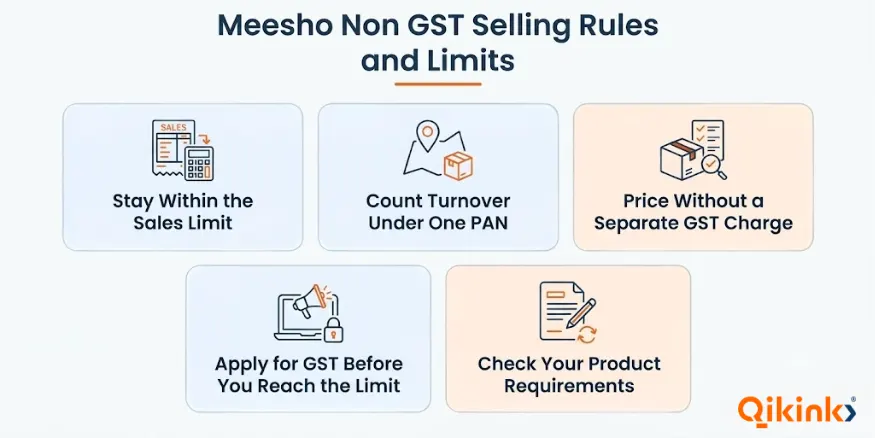
Selling on Meesho without GST is possible only when you meet both the legal requirements and the marketplace’s onboarding conditions. The main rules concern turnover, registration, pricing and products.
1. Stay Within the Sales Limit
Meesho states a yearly net sales limit of ₹40 lakh, or ₹20 lakh in northeastern states, for sellers using an Enrolment ID. Once your total annual net sales on Meesho and elsewhere cross the limit, Meesho restricts further sales on the account until you add a GSTIN.
The legal GST registration threshold is a separate matter. It depends on your business activities, state, aggregate turnover (your total sales value across all channels), and the provisions of GST law. Do not rely on Meesho’s platform limit alone to decide whether your business must register.
2. Count Turnover Under One PAN
GST law counts aggregate turnover across India for all businesses held under the same PAN. If you run more than one business or sell in more than one state under the same PAN, add the relevant turnover together when checking the limit.
3. Price Without a Separate GST Charge
Meesho said at launch that HSN codes (product classification codes used for GST) and GST percentages are optional in catalogue uploads for these sellers. Set your prices without adding GST as a separate line, since you cannot charge it without a GSTIN.
4. Apply for GST Before You Reach the Limit
GST law generally expects you to apply within 30 days of becoming liable to register. Starting the application while your total is still below the limit keeps your Meesho sales running without a gap.
5. Check Your Product Requirements
Some products need separate licences, approvals or compliance steps, so check the rules for your product before you list it. Meesho’s policies on catalogue approval, shipping and returns can change, so rely on the live Supplier Panel.
How to Track Sales and Check Your Eligibility?
Track your total sales every month, not only the amount earned through Meesho, because sales from other channels count toward the limit. You may be close to the limit even if your sales through Meesho alone are low.
Maintain a monthly record of:
- Meesho sales and order settlements.
- Sales through other marketplaces.
- Orders received through your own website or social media.
- Cancellations, adjustments, returns and refunds.
- The dates and values of transactions, along with supporting records.
For GST purposes, aggregate turnover is calculated under legal rules. It is not necessarily the same as the money deposited into your bank account or the profit you keep after expenses.
Tracking Sales Across Channels
Suppose a seller records the following sales during a financial year:
| Sales channel | Illustrative sales |
|---|---|
| Meesho | ₹17 lakh |
| Other marketplaces | ₹8 lakh |
| Instagram and direct orders | ₹5 lakh |
| Total sales | ₹30 lakh |
The seller’s total sales across these channels amount to ₹30 lakh, not just the ₹17 lakh shown in the Supplier Panel.
Whether ₹30 lakh is within the limit depends on the seller’s state, because the GST registration threshold for goods sold within the state is ₹40 lakh in most states and ₹20 lakh in some, such as Meghalaya. Sellers close to the threshold should seek tax advice.
Which Route Fits Your Situation?
The right registration route depends on your turnover, the states you plan to serve, and the type of GST compliance your business can manage.
| Your situation | Route to consider | Main point to check |
|---|---|---|
| You are a home-based seller, small shop owner or first-time seller selling in one state | Enrolment ID | Confirm all conditions under the non-GST exemption |
| You want to sell goods to customers across India | Regular GSTIN | Check registration requirements and marketplace rules |
| You are an eligible registered small business considering simpler GST compliance | Composition scheme | Confirm turnover eligibility, supply restrictions, and other conditions |
| You also sell offline or through social media | Enrolment ID, if your total stays within the limit | Include relevant sales when calculating aggregate turnover |
| You are close to the sales limit | Review your position before expanding | Get advice on when registration is required |
What Changes When You Move to a GSTIN?
Once your GST registration takes effect, the Enrolment ID stops being valid, as provided in Notification No. 34/2023-Central Tax. With a regular GSTIN, you can sell across India, charge GST on your bills and claim ITC on eligible business purchases. You also take on return filing and tax payment.
Apply for GST registration: Check which registration type suits your business and apply on the GST portal.
Update your Meesho account: Update your tax details in the Supplier Panel, or ask Meesho supplier support how to switch your account to the new GSTIN, because the steps can change.
Other Ways to Start Selling Without GST
Meesho is one way to start without a GSTIN, and it works best when you sell within one state. The same basic principles apply to other channels: stay below the registration threshold for your state and check each platform’s registration rules before listing products. Some other ways to sell without GST are:
- Instagram and social media: Orders come through messages or links, and you handle payments, packing and shipping yourself.
- Your own website: Set up your own store, payments and shipping, and you control branding and customer data.
- Other marketplaces: Each platform sets its own registration rules, so check whether it accepts sellers without a GSTIN before you apply.
Selling to customers in other states can change your GST position. If you want to build your own brand instead of selling inside a marketplace, Qikink provides dropshipping in India and print on demand services.
You can sell custom products without holding inventory, while Qikink handles printing, packing and shipping to your customers. Your GST obligations depend on your business model, turnover, products and customer locations.
How to Sell Online Legally?
Register and obtain a GST number, and stay updated with laws & rules
Dropshipping Legal Requirements →
Frequently Asked Questions
1. Can I Sell on Meesho Without a GST Number?
2. How to Sell My Product on Meesho?
3. What Is the Turnover Limit for Selling on Meesho Without GST?
4. How Do I Get an Enrolment ID for Meesho?
5. Can I Sell on Meesho With a Composition GSTIN?
6. Can I Sell on Meesho and Instagram Without GST?
7. Do I Need to Pay Income Tax if I Sell on Meesho Without GST?
Final Thoughts
Selling on Meesho without GST works when you sell within one state, keep your total sales under the limit and review your registration as sales grow. Keep your listings accurate, price your products after calculating your costs, and record sales from every channel each month.
When you want to build your own brand, Qikink’s dropshipping and print on demand services are the next place to look.
Sign Up Now →Read More
- How to Sell Products Online in India: Complete Guide
- How to Get GTIN Exemption from Amazon to Sell Products
- Top D2C Brands In India That Grow Fast: List Guide
- Average Dropshipping Income in India Per Month: Guide
Summarise the Article


Share the Article

